Author: Esther macharia

  • Table Banking in Kenya: How Groups Can Manage Savings, Loans and Contributions Digitally

    What Is Table Banking?

    Table Banking is a group-based financial model where members regularly contribute money into a common fund and then lend that money to members according to agreed rules.

    The concept is popular among chamas, women groups, youth groups, community organisations, investment groups and other member-based associations.

    In a typical table banking group, members meet regularly, contribute money and make decisions about how the pooled funds should be used.

    Some members may borrow from the group and repay the money with interest.

    The interest earned may then increase the value of the group’s fund and benefit the members collectively.

    Traditionally, table banking has been managed using:

    • Exercise books
    • Receipt books
    • Excel spreadsheets
    • WhatsApp groups
    • Mobile money messages
    • Individual treasurer records
    • Paper loan forms
    • Manual calculations

    While this approach may work for a small group, problems often begin when the number of members, loans and transactions increases.

    A modern Table Banking System can help a group organise its members, contributions, loans, repayments, penalties, income, expenses and reports from one central platform.


    Table Banking in Kenya
    Chama Document Management Software Kenya: 14 Record Controls — call 0725345345.

    How Does Table Banking Work?

    Table banking is built around members pooling money together and making the funds available within the group.

    The exact rules vary from one organisation to another.

    A typical process may look like this:

    1. Members register with the group.
    2. Each member agrees to make a regular contribution.
    3. Contributions are collected during agreed periods.
    4. The money forms a common table banking fund.
    5. Members can apply for loans according to group rules.
    6. Loan requests are reviewed and approved.
    7. The member receives the approved amount.
    8. The borrower repays the loan with agreed interest.
    9. Interest and other group income grow the common fund.
    10. The group generates reports and reviews its financial position.

    A digital Table Banking Management System makes each of these steps easier to record and monitor.


    Why Table Banking Is Popular in Kenya

    Table banking is attractive to many groups because it provides members with a structured way of saving and accessing credit within their own organisation.

    For many people, accessing formal credit may involve requirements such as:

    • Credit history
    • Collateral
    • Guarantors
    • Salary information
    • Business documentation
    • Lengthy approval processes

    Table banking groups create their own rules.

    Members already know one another, and lending decisions can be based on the group’s constitution and contribution history.

    The model also encourages members to build saving habits.

    Instead of each person saving individually, members create a common financial pool.


    Example of How Table Banking Works

    Assume a table banking group has 30 members.

    Every member contributes KSh 2,000 every month.

    The expected monthly contribution is:

    30 members × KSh 2,000 = KSh 60,000

    After six months, assuming everyone contributes consistently and ignoring expenses, the group may have:

    KSh 60,000 × 6 = KSh 360,000

    Some of this money can be issued as loans to members.

    For example:

    • Member A borrows KSh 50,000
    • Member B borrows KSh 30,000
    • Member C borrows KSh 20,000

    The group now needs to know:

    • When each loan was issued
    • Loan repayment period
    • Interest rate
    • Outstanding loan balance
    • Repayment dates
    • Penalties
    • Guarantors where applicable
    • Member contribution position
    • Total amount currently lent out
    • Total amount available in the fund

    Managing all these records manually can become difficult.

    This is where a Table Banking Software Kenya solution becomes useful.


    What Is a Table Banking System?

    A Table Banking System is software that helps groups manage their financial and membership activities.

    Instead of maintaining separate spreadsheets for members, contributions and loans, the organisation can keep the information in one platform.

    A table banking system may support:

    • Member registration
    • Contributions
    • Savings
    • Loans
    • Loan applications
    • Loan approvals
    • Repayments
    • Penalties
    • Guarantors
    • Income
    • Expenses
    • Meetings
    • Financial reports
    • Member statements
    • User roles
    • Audit history

    For groups that handle many transactions, this creates a more organised way of managing daily operations.


    Benefits of Using Table Banking Software

    1. Better Contribution Tracking

    Contributions are one of the most important parts of table banking.

    A digital system can help administrators see:

    • Expected contributions
    • Amount paid
    • Outstanding amount
    • Previous contributions
    • Advance payments
    • Penalties
    • Member contribution history

    Instead of checking WhatsApp messages or handwritten lists, the treasurer can review the contribution records directly.


    2. Improved Loan Management

    Loans can quickly become complicated.

    Consider a group with 100 members where 40 members currently have active loans.

    The administrators must know:

    • Original loan amount
    • Interest charged
    • Repayment period
    • Amount repaid
    • Remaining balance
    • Overdue amount
    • Penalty
    • Guarantors
    • Approval history

    A Table Banking Management System makes these records easier to organise.


    3. Member Statements

    Members often want to know their financial position.

    A member statement may include:

    • Contributions
    • Savings
    • Loans
    • Loan repayments
    • Penalties
    • Adjustments
    • Other group transactions

    Without software, producing a statement may require manually checking multiple records.

    A digital system can make the process much faster.


    4. Better Financial Transparency

    Transparency is important when members contribute money into a common fund.

    Group officials should be able to explain:

    • How much money has been collected
    • How much has been issued as loans
    • How much has been repaid
    • How much interest has been earned
    • What expenses have been incurred
    • What balance remains available

    A well-managed Table Banking System can provide reports that support this transparency.


    Important Features of a Table Banking Management System

    Member Management

    The system should maintain a central register of members.

    Information may include:

    • Full name
    • Membership number
    • Phone number
    • Email address
    • Date joined
    • Membership status
    • Group or branch
    • Next of kin
    • Identification information where applicable

    A central membership database makes it easier to manage a growing organisation.


    Contribution Management

    A table banking group may require members to contribute:

    • Weekly
    • Monthly
    • Quarterly
    • During meetings
    • When special projects arise

    The system should allow administrators to record each contribution accurately.

    This helps identify members who have:

    • Paid fully
    • Paid partially
    • Not paid
    • Paid in advance
    • Accumulated arrears

    Savings Management

    Some groups separate ordinary contributions from individual savings.

    The software should be able to distinguish different financial activities where necessary.

    For example:

    • Monthly contribution
    • Individual savings
    • Welfare contribution
    • Investment contribution
    • Special project contribution

    This separation improves reporting.


    Loan Application Management

    A proper system should provide a structured loan application process.

    The application may include:

    • Member
    • Amount requested
    • Loan type
    • Reason
    • Repayment period
    • Guarantors
    • Supporting documents
    • Application date

    The request can then move through the group’s approval workflow.


    Loan Approval Workflow

    Different groups approve loans differently.

    A loan may require approval from:

    • Chairperson
    • Treasurer
    • Credit committee
    • Management committee
    • Group members

    A digital workflow makes the process easier to follow.

    For example:

    Loan Application → Review → Approval → Disbursement → Repayment

    This provides a clear history of how the loan was processed.


    Loan Repayment Tracking

    After a loan has been issued, repayments must be recorded accurately.

    The system should show:

    • Loan amount
    • Principal repaid
    • Interest repaid
    • Outstanding principal
    • Outstanding interest
    • Next repayment date
    • Overdue amount
    • Loan status

    This is much easier than manually calculating every member’s balance.


    Interest Calculation

    Interest is an important part of many table banking groups.

    Groups may use different methods.

    Examples include:

    • Flat-rate interest
    • Reducing balance
    • Fixed monthly percentage
    • Fixed total interest

    A Table Banking Software Kenya solution should be configured to match the rules of the group.

    The organisation should confirm how interest is calculated before implementation.


    Guarantor Management

    Some table banking groups require members to guarantee one another’s loans.

    The system may need to record:

    • Borrower
    • Guarantor
    • Guaranteed amount
    • Loan reference
    • Guarantor status
    • Outstanding guaranteed obligation

    This is particularly important when one member guarantees several loans.


    Penalty Management

    Groups may impose penalties for:

    • Late contributions
    • Missed meetings
    • Late loan repayments
    • Failure to meet group requirements

    A digital system can help administrators apply and track these penalties consistently.


    Income and Expense Management

    Table banking groups receive and spend money in different ways.

    Income may include:

    • Member contributions
    • Loan interest
    • Registration fees
    • Penalties
    • Donations
    • Investment income

    Expenses may include:

    • Meeting costs
    • Administration
    • Communication
    • Bank charges
    • Professional fees
    • Group activities

    Recording this information makes financial reporting more complete.


    Cash and Bank Management

    Groups may keep money through:

    • Bank accounts
    • Mobile money
    • Cash
    • SACCO accounts
    • Other approved financial channels

    A table banking system should provide a structured way of recording money moving in and out of these accounts.


    Financial Reports

    Reports are important for decision-making.

    A strong system should provide useful reports such as:

    Contribution Report

    Shows money contributed by members.

    Loan Report

    Shows active, completed and overdue loans.

    Loan Repayment Report

    Shows repayments made by members.

    Outstanding Loan Report

    Identifies loans that still have unpaid balances.

    Member Statement

    Shows the financial history of a particular member.

    Income Report

    Shows income received by the group.

    Expense Report

    Shows expenditure.

    Penalty Report

    Shows penalties charged and paid.

    Group Financial Summary

    Provides an overview of the group’s financial position.


    Table Banking System vs Manual Records

    Many groups begin with manual records.

    However, the difference becomes significant as membership increases.

    Feature Manual Table Banking Digital Table Banking System
    Member records Books and spreadsheets Central database
    Contributions Manually calculated Structured tracking
    Loans Paper files Digital records
    Repayments Manual calculations Recorded per loan
    Member statements Time-consuming Easier to generate
    Reports Manual System generated
    User permissions Limited Role-based
    Audit history Difficult Better traceability
    Multi-branch support Difficult Easier to organise
    Leadership transition File dependent Centralised records

    Manual records are not automatically wrong.

    However, the workload becomes harder to manage as the group grows.


    Table Banking vs Merry-Go-Round

    These two models are sometimes confused.

    A merry-go-round generally involves members contributing a fixed amount and giving the combined contribution to one member at a time.

    For example:

    Ten members contribute KSh 5,000.

    The total contribution is KSh 50,000.

    One member receives the KSh 50,000 during that cycle.

    The next member receives the contribution during the next cycle.

    Table banking is different.

    Instead of distributing the entire contribution to one member, the money remains within a shared fund and can be loaned to members.

    This allows the fund to continue growing.


    Table Banking vs Chama

    A chama is a broader term.

    A chama may operate:

    • Savings
    • Investments
    • Merry-go-round
    • Welfare funds
    • Loans
    • Property investments
    • Business investments
    • Table banking

    Therefore, table banking can be one activity within a chama.

    A Chama Management System can support broader functionality, while a table banking platform focuses heavily on contributions, savings and member lending.


    Table Banking for Women Groups in Kenya

    Women groups have played a major role in the growth of table banking in Kenya.

    Members can combine small regular contributions and create access to a larger shared financial pool.

    The group can then use the fund according to its constitution.

    For example, members may use loans for:

    • Small businesses
    • Farming
    • Education
    • Household projects
    • Stock purchases
    • Business expansion

    Digital management helps such groups keep better records as membership and transaction volumes increase.


    Table Banking for Youth Groups

    Youth groups can also use table banking to build financial discipline.

    Members contribute regularly and access loans based on agreed rules.

    The system can help youth organisations manage:

    • Membership
    • Contributions
    • Loans
    • Repayments
    • Group projects
    • Reports

    Having clear records is especially important when the group begins handling significant amounts of money.


    Table Banking for Investment Groups

    Investment groups can use table banking alongside investment activities.

    For example, the group may:

    1. Collect member contributions.
    2. Issue short-term loans.
    3. Earn interest.
    4. Build the group’s capital.
    5. Invest part of the accumulated fund.

    The system should separate loan activities from investment transactions where required.


    Table Banking for Employee Groups

    Employees working in the same organisation may establish an internal table banking group.

    Members can contribute through agreed payment channels and borrow from the pooled fund.

    A digital platform can make administration easier, particularly when there are many employees.


    Table Banking for Churches and Community Groups

    Church and community groups may also create savings and lending programmes.

    A digital system can provide more organised management of:

    • Members
    • Contributions
    • Loans
    • Repayments
    • Welfare activities
    • Reports

    The organisation should always define its own rules before selecting software.


    How to Start a Table Banking Group

    Starting table banking requires more than collecting money.

    The group should establish clear rules.

    Step 1: Form the Group

    Identify members who want to participate.

    Step 2: Create a Constitution

    The constitution should define how the group operates.

    It may include:

    • Membership rules
    • Contribution amount
    • Loan eligibility
    • Interest rate
    • Repayment period
    • Penalties
    • Guarantor requirements
    • Leadership roles
    • Meeting rules
    • Exit procedures

    Step 3: Appoint Officials

    Typical roles include:

    • Chairperson
    • Secretary
    • Treasurer
    • Credit officer
    • Committee members

    Step 4: Establish Contribution Rules

    Agree on:

    • Contribution amount
    • Frequency
    • Payment deadline
    • Penalties

    Step 5: Define Loan Rules

    Decide:

    • Maximum loan
    • Interest rate
    • Repayment period
    • Guarantor requirements
    • Loan approval process

    Step 6: Choose a Record-Keeping System

    Small groups may begin manually.

    However, groups planning to grow should consider a digital Table Banking Management System.

    Step 7: Start Recording Transactions

    Every contribution, loan, repayment and expense should be recorded.


    Challenges of Table Banking

    Table banking can be very effective, but groups can experience several challenges.

    Poor Record Keeping

    When records are incomplete, disagreements can develop.

    Loan Defaults

    Members may fail to repay loans according to agreed schedules.

    Leadership Disputes

    Lack of transparency may create conflict between members and officials.

    Manual Calculation Errors

    Interest, repayments and balances may be calculated incorrectly.

    Missing Documents

    Paper records can be misplaced.

    Fraud Risk

    Weak controls can make group funds more difficult to monitor.

    Leadership Handover Problems

    New officials may struggle to understand old records.

    A digital system can reduce many of these administrative challenges.


    How Table Banking Software Improves Accountability

    A good table banking platform creates a clear record of activities.

    Administrators can review:

    • Who recorded a contribution
    • When a loan was approved
    • Who approved it
    • How much was disbursed
    • How much has been repaid
    • Which penalties were applied
    • Which transactions were edited

    This information makes it easier to investigate questions raised by members.


    Role-Based Access in Table Banking Software

    Not every user should have the same permissions.

    For example:

    Treasurer

    May record contributions and payments.

    Secretary

    May manage members and meetings.

    Credit Officer

    May review loan applications.

    Chairperson

    May approve certain transactions.

    Administrator

    May manage system configuration.

    Auditor

    May receive read-only access to reports.

    Role-based permissions help reduce unnecessary access to sensitive group information.


    Multi-Branch Table Banking Groups

    Some organisations have members in different locations.

    A digital system may organise members by:

    • Branch
    • County
    • Region
    • Department
    • Chapter

    Head-office administrators can then review consolidated reports while authorised branch officials manage their respective members.


    Mobile Money and Table Banking

    Mobile money has become an important payment channel for many groups.

    Members may use mobile payments to make:

    • Contributions
    • Loan repayments
    • Penalty payments
    • Special contributions

    When supported integrations are implemented, transaction reconciliation can become easier.

    The group should always confirm which payment integrations are supported before selecting a system.


    What to Look for in Table Banking Software Kenya

    When choosing a Table Banking Software Kenya solution, consider the following areas.

    Ease of Use

    Officials should be able to understand the system without complicated technical knowledge.

    Member Management

    The software should maintain organised member records.

    Contribution Tracking

    Contribution records should be easy to review.

    Loan Management

    The platform should support the group’s actual lending rules.

    Interest Calculation

    Ensure the software supports your agreed interest model.

    Repayment Tracking

    Outstanding balances should be clear.

    Reports

    Ask to see actual reports before implementation.

    User Permissions

    Different officials should have appropriate access.

    Audit Trail

    Important actions should be traceable.

    Data Export

    Your organisation should understand how records can be exported.

    Support

    Confirm whether assistance is available when administrators need help.


    How TAS Supports Table Banking Groups

    TAS provides digital tools designed for member-based organisations such as chamas, welfare groups and table banking groups.

    A properly configured implementation can help organise important processes including:

    • Member management
    • Contributions
    • Savings
    • Loans
    • Repayments
    • Income
    • Expenses
    • Meetings
    • Reports
    • User permissions
    • Financial records

    The objective is to help organisations move away from scattered spreadsheets and paper records toward a centralised management platform.

    For groups handling both savings and lending, a wider Chama Management System Kenya approach may provide more flexibility as the organisation grows.


    Why Digital Table Banking Is Important for Growing Groups

    A group with ten members can sometimes manage using a notebook.

    A group with 500 members requires much stronger controls.

    Growth creates more:

    • Transactions
    • Loans
    • Repayments
    • Reports
    • Questions
    • User accounts
    • Financial responsibility

    Digital systems help organisations manage this complexity.

    The value of the software is not simply that it stores records.

    The real value is that it makes records easier to organise, retrieve, verify and report.


    Frequently Asked Questions About Table Banking

    What is table banking?

    Table banking is a financial model where members contribute money into a common fund and then lend the pooled money to members according to agreed rules.

    How does table banking work?

    Members make regular contributions. The pooled money is used to provide loans to qualifying members. Borrowers repay the loans according to agreed terms, often with interest.

    Is table banking the same as a chama?

    No. A chama can undertake many activities including savings, investments, loans, welfare and merry-go-rounds. Table banking is one financial model that a chama may use.

    What is a Table Banking System?

    A Table Banking System is software used to manage members, contributions, savings, loans, repayments, penalties and financial reports.

    Can table banking software calculate loans?

    Yes, depending on the system configuration. The organisation should ensure that the software supports its interest and repayment rules.

    Can table banking software manage guarantors?

    A suitable system can record guarantors and guaranteed loan obligations.

    Can table banking software generate member statements?

    Yes. Member statements can show contributions, loans, repayments and other financial activities.

    Can a table banking system manage penalties?

    Yes. Penalties for late contributions, missed meetings or overdue loan repayments can be recorded according to the group’s rules.

    Can table banking work for women groups?

    Yes. Women groups are among the organisations that frequently use table banking models.

    Can youth groups use table banking?

    Yes. Youth groups can use table banking for savings, lending and group financial development.

    Can table banking be managed online?

    Yes. Cloud-based table banking software allows authorised users to manage group records digitally.

    Is Excel enough for table banking?

    Excel may be suitable for small groups, but larger groups may require better user permissions, loan management, member statements, audit history and reporting.

    What is the best table banking software in Kenya?

    The best software depends on your group’s membership size, contribution rules, loan structure, approval workflow, reporting requirements and expected growth.


    Get a Table Banking Management System in Kenya

    If your group currently manages contributions, loans and repayments using notebooks, WhatsApp messages and spreadsheets, moving to a digital Table Banking System can make administration easier.

    A well-implemented system can help you manage:

    • Members
    • Contributions
    • Savings
    • Loans
    • Repayments
    • Penalties
    • Income
    • Expenses
    • Financial reports

    The most important step is to choose a platform that reflects how your group actually operates.

    Before implementation, document your contribution rules, loan rules, interest rates, repayment schedules and approval processes.

    Then test the system using real examples.

    Table Banking in Kenya provides groups with a practical way to combine member contributions, provide access to loans and build collective financial resources.

    However, as the group grows, proper record keeping becomes increasingly important.

    A modern Table Banking Management System can help groups improve contribution tracking, loan management, repayment monitoring, accountability and reporting.

    Instead of depending on multiple spreadsheets, paper files and individual officials, groups can maintain their important records from one central platform.

    Whether you manage a women group, youth group, employee association, investment group, church group or community organisation, digital table banking can provide a stronger foundation for sustainable growth.

    TAS provides digital tools designed to help Kenyan chamas, welfare groups and table banking organisations manage their members, contributions, loans and financial records more efficiently.
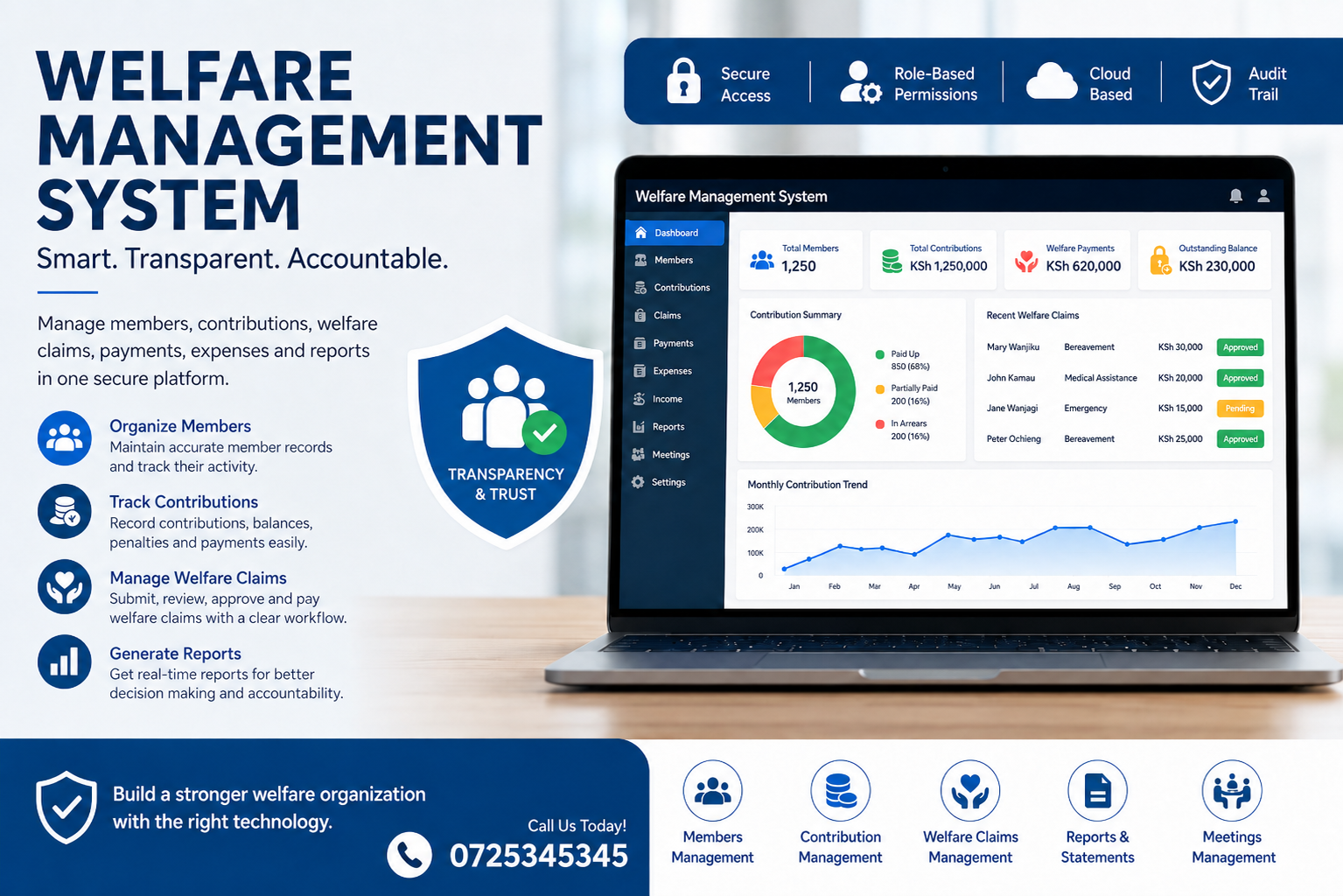

  • Welfare Management System in Kenya: Complete Guide for Modern Welfare Groups

    Welfare Management System is becoming essential for welfare groups, employee associations, chamas, community organisations, churches, family welfare groups and other membership-based organisations that collect contributions and provide financial support to their members.

    Many welfare groups in Kenya begin informally.

    Members create a WhatsApp group, agree on a monthly contribution and appoint a chairperson, secretary and treasurer. Contributions may initially be recorded in a notebook, Excel spreadsheet or mobile phone.

    This may work when there are only a few members.

    However, when the group grows to 50, 100, 500 or even thousands of members, administration becomes much more complicated.

    Officials must know:

    • Who has paid?
    • Who has not paid?
    • How much has every member contributed?
    • How much money is available in the welfare fund?
    • Which member received a welfare benefit?
    • Why was the benefit paid?
    • Who approved the payment?
    • Which claims are still pending?
    • What expenses has the organisation incurred?
    • What penalties are outstanding?
    • What is each member’s current balance?
    • Can previous transactions be verified?
    • Can financial reports be prepared quickly?

    A properly implemented Welfare Management System brings these activities into one organised digital platform.

    Instead of depending on disconnected spreadsheets, notebooks, WhatsApp messages and individual officials, the organisation creates a central record that authorised users can manage and review.

    What Is a Welfare Management System?

    A Welfare Management System is software designed to help member-based organisations manage welfare contributions, members, claims, benefits, payments, expenses, financial records and reports.

    The system provides administrators with a structured environment for recording the activities of the welfare organisation.

    For example, assume an organisation has 200 members and every member contributes KSh 1,000 monthly.

    The administrators need to track:

    • 200 individual member accounts
    • KSh 200,000 in expected monthly contributions
    • Missed contributions
    • Advance payments
    • Penalties
    • Welfare claims
    • Approved benefits
    • Expenses
    • Payment references
    • Member statements
    • Financial reports

    Doing this manually every month creates hundreds or thousands of records.

    A digital Welfare Management System Kenya solution makes these records easier to organise, retrieve, verify and report.


    Why Welfare Groups Need Management Software

    Running a welfare organisation involves much more than collecting money.

    A welfare group may support members during circumstances such as bereavement, illness, emergencies, family events or other situations defined within the group’s constitution.

    Each organisation has its own rules.

    Some groups contribute monthly.

    Others contribute whenever a qualifying event occurs.

    Some maintain multiple funds.

    Others operate one general welfare fund.

    As membership increases, officials need better systems for maintaining these records.

    Problems with Manual Welfare Management

    Manual administration commonly creates several difficulties.

    1. Difficult Contribution Tracking

    A treasurer may receive payments from dozens or hundreds of members.

    Without a central system, identifying who has paid can require checking:

    • M-Pesa messages
    • Bank statements
    • Excel sheets
    • Receipt books
    • WhatsApp messages
    • Handwritten records

    This becomes increasingly difficult as transactions accumulate.

    2. Missing Member Records

    Members can change phone numbers, employment locations, addresses or other details.

    If records are scattered across different files, the organisation may not know which information is current.

    3. Difficult Welfare Claim Management

    When a member requests assistance, officials may need to establish:

    • Whether the member is active
    • Whether contributions are up to date
    • Whether the event qualifies
    • The amount the member is entitled to
    • Supporting documents required
    • Who should approve the request

    Without a structured process, claims may be handled inconsistently.

    4. Poor Accountability

    Members naturally want to understand how their contributions are being used.

    If financial records cannot easily be produced, misunderstandings can develop between members and officials.

    A Welfare Fund Management System helps create an organised record of transactions.

    5. Complicated Leadership Handover

    Officials eventually change.

    A new treasurer should not have to depend entirely on spreadsheets stored on the previous treasurer’s laptop.

    A central welfare management platform creates continuity when responsibilities move from one committee to another.


    Key Features of a Welfare Management System

    Different organisations have different requirements, but a strong Welfare Management System should support the most important welfare administration processes.

    1. Member Management

    Everything starts with members.

    The system should maintain an organised member register containing relevant information such as:

    • Member name
    • Membership number
    • Contact information
    • Date joined
    • Membership status
    • Contribution category
    • Branch or department
    • Next of kin where applicable
    • Supporting membership information

    Administrators should be able to search for members quickly rather than going through paper files.

    A central member database also helps reduce duplicate records.


    2. Welfare Contribution Management

    Regular contributions are the financial foundation of many welfare groups.

    A Welfare Contribution Management System should make it easy to record contributions against individual members.

    For example:

    Member Expected Paid Balance
    Member A KSh 1,000 KSh 1,000 KSh 0
    Member B KSh 1,000 KSh 500 KSh 500
    Member C KSh 1,000 KSh 1,000 KSh 0
    Member D KSh 1,000 KSh 0 KSh 1,000

    Instead of calculating these balances manually, the system can maintain contribution records connected to each member.

    This makes it easier to identify:

    • Fully paid members
    • Partially paid members
    • Members in arrears
    • Advance contributions
    • Historical contributions
    • Contribution totals

    3. Multiple Welfare Funds

    Larger organisations may operate more than one fund.

    For example:

    • General welfare fund
    • Bereavement fund
    • Emergency fund
    • Education support fund
    • Medical assistance fund
    • Development fund
    • Special project fund

    A suitable Welfare Management Software Kenya solution should allow the organisation to separate different financial activities where required.

    This makes reporting clearer.

    Instead of showing one unexplained total, officials can understand how money has been allocated across different welfare activities.


    4. Welfare Claims Management

    Claims are one of the most important parts of welfare administration.

    When a member requests financial assistance, there should be a clear process.

    A typical workflow may include:

    Member request → Verification → Review → Approval → Payment → Reporting

    The organisation may need to record:

    • Member making the request
    • Claim category
    • Date submitted
    • Description
    • Supporting documentation
    • Amount requested
    • Amount approved
    • Approval status
    • Payment reference
    • Date paid
    • Officials involved

    This creates a more accountable process than handling every request through informal messages.

    Groups with more complex welfare processes should also review how a dedicated Welfare Claims Management Software Kenya workflow can support eligibility checks, approvals and payment records.


    5. Approval Workflows

    Financial decisions should not depend on one person.

    Depending on the organisation’s constitution, welfare requests may require approval from:

    • Chairperson
    • Treasurer
    • Secretary
    • Welfare committee
    • Finance committee
    • Management
    • Board members

    A digital system can support defined responsibilities so that authorised officials participate in the process.

    For example:

    Claim submitted → Welfare Officer reviews → Treasurer verifies funds → Chairperson approves → Payment recorded

    Having a clear process improves accountability.


    6. Income and Expense Management

    Welfare organisations receive money and spend money.

    Therefore, administrators need more than a contribution register.

    They also need to understand cash movement.

    Income may include:

    • Member contributions
    • Registration fees
    • Penalties
    • Donations
    • Fundraising income
    • Investment income
    • Special contributions

    Expenses may include:

    • Welfare payments
    • Administrative expenses
    • Bank charges
    • Meeting expenses
    • Communication costs
    • Professional services
    • Operational expenses

    A Welfare Management System should make these records easier to categorise and report.


    7. Member Statements

    One of the easiest ways to improve transparency is to give members understandable statements.

    A statement may show:

    • Member details
    • Contributions
    • Penalties
    • Payments
    • Adjustments
    • Welfare benefits
    • Outstanding obligations

    Instead of asking the treasurer to manually calculate a member’s history, the required information can be retrieved from the system.


    8. Welfare Reports

    Management decisions become easier when accurate reports are available.

    Useful welfare reports may include:

    Contribution Report

    Shows contributions received during a selected period.

    Outstanding Contribution Report

    Identifies members who have unpaid balances.

    Welfare Payment Report

    Shows benefits or assistance paid to members.

    Expense Report

    Provides information about expenditure.

    Member Statement

    Displays transactions relating to an individual member.

    Fund Summary

    Shows activity within a particular welfare fund.

    Income Report

    Shows money received by the organisation.

    Audit Report

    Provides a history of important activities and changes where supported.

    Reports help committees prepare for meetings, financial reviews and decision-making.


    9. Role-Based Access

    Not every official should have unlimited access.

    A welfare organisation might have:

    • Chairperson
    • Secretary
    • Treasurer
    • Administrator
    • Welfare officer
    • Accountant
    • Auditor
    • Branch administrator

    Each role may require different permissions.

    For example, someone responsible for member registration may not need permission to approve financial payments.

    Role-based access can help organisations apply clearer responsibility within the system.


    10. Audit Trail

    Accountability is especially important when managing members’ money.

    A strong welfare management platform should preserve enough transaction history for authorised officials to understand important changes.

    For example:

    • Who entered a transaction?
    • When was it entered?
    • Was it changed?
    • Who approved a transaction?
    • What payment reference was used?

    An audit history can be especially useful during leadership transitions and financial reviews.


    11. Branch and Department Management

    Some welfare organisations operate across multiple locations.

    Examples include:

    • Employee welfare schemes
    • National associations
    • Church organisations
    • Professional associations
    • Alumni organisations
    • Community organisations
    • Multi-branch companies

    A Welfare Management System Kenya can be designed to organise members by branch, department, location or another suitable structure.

    This makes it easier for central administrators to review overall activity while individual branches manage permitted operations.


    12. Digital Records and Document Management

    Welfare administration can involve supporting documents.

    Depending on the organisation, these may include:

    • Application forms
    • Membership documents
    • Claim evidence
    • Approval records
    • Payment documentation
    • Meeting records

    Digitising these processes can reduce dependence on physical paperwork and make authorised retrieval easier.

    Sensitive documents should always be handled according to the organisation’s privacy, access and retention requirements.


    13. Meeting Management

    Many welfare groups make important decisions during meetings.

    Officials may need to maintain:

    • Meeting dates
    • Attendance
    • Agenda items
    • Decisions
    • Minutes
    • Resolutions

    Connecting meeting administration with the organisation’s broader management process creates a stronger institutional record.

    For organisations that also handle savings, loans, guarantors and investments, a broader Chama Management System Kenya may provide additional functionality beyond welfare administration.


    Types of Organisations That Can Use a Welfare Management System

    A Welfare Management System can support many types of member-based organisations.

    Employee Welfare Groups

    Companies may establish employee welfare programmes where workers contribute periodically to support colleagues during qualifying events.

    Software can help administrators organise members, contributions and benefits.

    Chama Welfare Groups

    Many Kenyan chamas maintain a welfare fund alongside savings and investments.

    A digital platform can help separate welfare transactions from other group financial activity.

    Church Welfare Groups

    Churches may operate welfare programmes for members.

    A structured system can assist committees with maintaining membership, contributions, approved assistance and reports.

    Family Welfare Groups

    Large extended families sometimes establish welfare funds where relatives contribute monthly.

    As membership and transactions increase, digital administration becomes more practical.

    Alumni Associations

    School, college and university alumni associations frequently establish welfare programmes for members.

    Management software can provide a central membership and financial record.

    Professional Associations

    Professional groups may collect membership contributions and provide welfare benefits to qualifying members.

    Community Organisations

    Community-based organisations may use welfare funds to support members during approved circumstances.

    Sacco and Cooperative Welfare Programmes

    Some larger member organisations maintain welfare programmes alongside their main operations.

    A dedicated workflow can make welfare transactions easier to separate and review.


    Benefits of Using a Welfare Management System

    Digitising welfare administration provides several practical advantages.

    Better Transparency

    Members can understand how money is collected and used when accurate records are maintained.

    Faster Reporting

    Officials do not need to calculate every report manually.

    Improved Accountability

    Transactions can be associated with dates, members, categories and relevant references.

    Reduced Administrative Work

    Routine calculations and searches become easier when records are organised.

    Easier Leadership Handover

    New officials inherit structured records instead of disconnected personal files.

    Better Member Experience

    Questions about balances, payments and contributions can be answered more efficiently.

    Easier Growth

    The organisation can continue operating as membership and transaction volumes increase.


    Welfare Management System vs Excel

    Many welfare organisations initially use Excel.

    Excel is useful and flexible, but larger member organisations may eventually require stronger workflow controls.

    Area Excel/Manual Records Welfare Management System
    Member records Separate sheets Centralised
    Contributions Manual entries Structured member records
    Claims Often separate Connected workflow
    Reports Manual formulas System-generated reports
    User permissions Limited Role-based
    Audit history Difficult Better traceability
    Multi-user access Can be difficult Designed for authorised users
    Leadership handover File dependent Central system
    Member statements Often manual Easier to generate
    Scaling Increasingly difficult Better suited to growth

    Excel does not automatically become unsuitable simply because an organisation grows.

    However, when officials spend increasing amounts of time reconciling spreadsheets, searching WhatsApp messages and correcting inconsistent records, it may be time to consider a dedicated Welfare Management System.


    Welfare Management System vs Chama Management System

    These two systems are closely related but may serve different requirements.

    A Welfare Management System focuses primarily on:

    • Welfare members
    • Welfare contributions
    • Benefits
    • Claims
    • Approvals
    • Welfare funds
    • Expenses
    • Reporting

    A broader chama management platform may additionally include:

    • Savings
    • Loans
    • Loan repayment schedules
    • Guarantors
    • Investments
    • Meetings
    • Budgets
    • Financial administration

    A welfare group that only collects contributions for member support may not require extensive loan functionality.

    An investment chama with a welfare fund may benefit from a broader Chama Management System.

    The correct choice depends on the organisation’s constitution and actual processes.


    How to Choose the Best Welfare Management System in Kenya

    Do not choose software simply because it has the longest feature list.

    Start with your organisation’s real processes.

    Check Member Capacity

    How many members do you currently have?

    How many do you expect within the next few years?

    Choose software that can accommodate reasonable growth.

    Review Contribution Rules

    Determine whether the software can handle the way your organisation collects contributions.

    Questions to ask include:

    • Are contributions monthly?
    • Are there different contribution categories?
    • Can members pay in advance?
    • What happens when someone misses a contribution?
    • Are penalties applied?
    • Are special contributions collected?

    Test Your Welfare Workflow

    Use a realistic example during a demonstration.

    For example:

    1. Register a member.
    2. Record contributions.
    3. Submit a welfare request.
    4. Review the request.
    5. Approve it.
    6. Record payment.
    7. Generate the relevant reports.

    If the process cannot reproduce how your organisation works, clarify the requirement before implementation.

    Review Permissions

    Determine which officials can:

    • Add members
    • Record contributions
    • Edit transactions
    • Approve welfare claims
    • Record payments
    • View financial reports
    • Configure the organisation

    Check Reporting

    Do not accept the statement “the software has reports” without reviewing them.

    Ask to see actual examples.

    Review Data Export

    Your organisation should understand how its information can be exported for authorised use.

    Review Support

    Ask what happens when administrators need assistance.

    Test Before Full Implementation

    A controlled pilot is often better than immediately migrating every historical record.

    Test the important workflows first.


    How to Implement a Welfare Management System Successfully

    Software alone will not solve unclear administrative processes.

    The welfare organisation should prepare before implementation.

    Step 1: Document Your Welfare Rules

    Clearly define:

    • Contribution amounts
    • Payment deadlines
    • Penalties
    • Membership eligibility
    • Welfare categories
    • Benefit limits
    • Claim requirements
    • Approval responsibilities

    Step 2: Clean Your Member Records

    Remove duplicates and confirm important member information.

    Step 3: Confirm Opening Balances

    Before moving to a new platform, ensure current balances are understood and approved.

    Step 4: Configure User Roles

    Give officials only the permissions required for their responsibilities.

    Step 5: Test Sample Transactions

    Run realistic transactions before launching fully.

    Step 6: Reconcile Results

    Compare system totals against approved records.

    Step 7: Train Administrators

    Officials should understand the workflow before relying on the system for daily administration.

    Step 8: Roll Out to Members

    Once administrators are comfortable, introduce relevant member-facing processes according to the organisation’s implementation plan.


    Why Kenyan Welfare Organisations Are Moving Toward Digital Management

    Member organisations are handling increasing amounts of information.

    Members also expect greater transparency.

    A treasurer should ideally be able to answer questions such as:

    “How much did we collect last month?”

    “How much is outstanding?”

    “How much has been paid in welfare benefits?”

    “Which transactions created this balance?”

    “Which members have outstanding contributions?”

    “What is the current position of the welfare fund?”

    When records exist in multiple notebooks, spreadsheets and phones, answering these questions becomes difficult.

    Digital welfare management creates one structured environment for authorised officials to maintain the records required to answer them.


    How TAS Can Support Welfare Management

    TAS is designed around the administration of Kenyan member-based organisations.

    The platform brings important group processes into a structured digital environment, including areas such as:

    • Member administration
    • Contributions
    • Financial records
    • Income and expenses
    • Meetings
    • Reporting
    • User permissions
    • Audit history
    • Data management

    For organisations operating both welfare and chama activities, having connected member and financial records can reduce the need to maintain separate files for every process.

    Groups should always test the system using their actual constitution and workflows before full deployment.

    Recommended Internal Link

    Use the anchor text Chama Management System Kenya to link to the existing TAS chama management guide.

    Recommended Internal Link

    Use the anchor text Welfare Claims Management Software Kenya to link to the TAS welfare claims guide.

    Recommended Internal Link

    Use the anchor text Chama Software Kenya to link to the relevant TAS chama software article.

    These supporting pages create a useful topical cluster around welfare, contributions and group administration.


    Frequently Asked Questions About Welfare Management Systems

    What is a Welfare Management System?

    A Welfare Management System is software used by member organisations to manage members, welfare contributions, claims, benefits, income, expenses and reports in one structured environment.

    Which organisations can use Welfare Management Software?

    Employee welfare groups, chamas, churches, family groups, alumni associations, professional associations, community groups and other member-based organisations can use welfare management software.

    Can a Welfare Management System track member contributions?

    Yes. Contribution tracking is one of the main functions expected from a welfare management platform. Contributions should be linked to individual member records.

    Can welfare software show members who have not contributed?

    A properly configured system can use expected and recorded contributions to help administrators identify outstanding member balances.

    Can welfare claims be managed digitally?

    Yes. Welfare claims can be organised using structured workflows covering submission, review, approval, payment and reporting.

    Can welfare management software generate member statements?

    Many systems provide member-level records or statements showing contributions and other relevant transactions.

    Is a Welfare Management System suitable for employee welfare?

    Yes. Employee welfare organisations can use software to maintain membership records, contributions, welfare requests, approvals and reporting.

    Is a Welfare Management System suitable for churches?

    Church welfare groups that collect contributions and provide member assistance can benefit from structured digital administration.

    Can welfare management software support multiple branches?

    Depending on the system and plan, organisations operating across different branches or locations can use branch-based administration.

    How much does a Welfare Management System cost in Kenya?

    Pricing varies depending on the number of members, administrators, modules, branches, integrations, implementation requirements and support level. Organisations should obtain a quotation based on their actual workflow instead of comparing price alone.

    Can we move from Excel to a Welfare Management System?

    Yes. Existing member and financial data can potentially be prepared for migration, but records should first be cleaned, reconciled and verified.

    What is the difference between a welfare system and chama software?

    A welfare system concentrates on welfare contributions, claims and member benefits. Chama software may additionally manage savings, loans, guarantors, repayments, investments and other group activities.

    What is the best Welfare Management System in Kenya?

    The best system is the one that accurately supports your organisation’s contribution rules, approval process, reporting requirements, user permissions and growth plans. Test your actual workflows before making a final decision.


    Get a Welfare Management System for Your Organisation

    Managing a growing welfare organisation using notebooks, spreadsheets and WhatsApp messages can eventually create unnecessary administrative work.

    A modern Welfare Management System provides a more structured way to manage members, contributions, welfare transactions, income, expenses and reports.

    The objective is not simply to replace paperwork with software.

    The objective is to create a reliable administrative process where authorised officials can understand:

    • Who contributed
    • How much was contributed
    • What remains outstanding
    • Which welfare requests were processed
    • What payments were made
    • What expenses were incurred
    • How current balances were produced

    Whether you manage an employee welfare association, chama welfare fund, church welfare programme, family welfare group, alumni association or community organisation, digital management can provide a stronger foundation for accountability and sustainable growth.

    TAS provides digital tools designed for modern Kenyan member-based organisations.

    Request a demonstration and test your organisation’s real workflow—from member registration and contributions to welfare administration and reporting.

    A Welfare Management System in Kenya can help organisations move away from fragmented spreadsheets, notebooks and manual administration toward a more organised digital workflow.

    The most effective implementation combines good software with clear welfare rules, accurate member records, defined user permissions, reconciled opening balances and regular reporting.

    As your membership grows, having structured records becomes increasingly important.

    Start by documenting how your welfare organisation works today.

    Then choose a platform that can support those processes while giving your organisation enough flexibility to grow.

    For Kenyan welfare groups looking to digitise their operations, TAS offers a practical platform for managing members, contributions, financial records and other important group activities from one central environment.

  • Chama Document Management Software Kenya: 14 Record Controls

    Chama Document Management Software Kenya: 14 Record Controls

    chama document management software Kenya helps Kenyan groups replace informal, person-dependent administration with a controlled record that members and authorised officials can examine. It is most valuable when configured around the group’s constitution, approved policies and real operating responsibilities.

    A chama’s most important decisions often live in scattered WhatsApp attachments, personal email accounts and paper files. When leadership changes, the group may struggle to find the current constitution, signed minutes, loan evidence or supplier records. A document system should create an organised institutional memory without giving everyone unrestricted access. The goal is simple retrieval, clear versions, responsible permissions and dependable backup. These controls provide a practical evaluation checklist.

    chama document management software Kenya guide by TAS
    Chama Document Management Software Kenya: 14 Record Controls — call 0725345345.

    Why this workflow matters for Kenyan chamas

    Chamas depend on trust, but durable trust needs verifiable records. When information is split between notebooks, spreadsheets, private phones and chat threads, officials spend meetings rebuilding facts instead of making decisions. A connected system can reduce that friction, provided the group agrees on who records, who approves and who reviews each action.

    Technology is not a substitute for governance, legal advice, accounting review or the group constitution. Treat it as an operating tool. Start with the TAS chama management system guide, compare the TAS features, and confirm the required workflow during a controlled trial.

    1. Create a records classification

    Group documents into useful classes such as governance, members, meetings, finance, loans, suppliers, assets and compliance. A shared classification makes filing predictable. For chama document management software Kenya, committees should verify this control during a trial using realistic records rather than accepting a feature-list promise.

    Write the rule, responsible role, evidence required and review frequency. This makes the control repeatable when officials change and gives members a clear basis for follow-up.

    2. Use consistent file names

    Include the document type, date, subject and version where appropriate. Avoid names like final-final2 because they hide the history. For chama document management software Kenya, committees should verify this control during a trial using realistic records rather than accepting a feature-list promise.

    Write the rule, responsible role, evidence required and review frequency. This makes the control repeatable when officials change and gives members a clear basis for follow-up.

    3. Identify the authoritative version

    Mark which constitution, policy or approved minute is current. Keep older versions for history but prevent members from mistaking them for active rules. For chama document management software Kenya, committees should verify this control during a trial using realistic records rather than accepting a feature-list promise.

    Write the rule, responsible role, evidence required and review frequency. This makes the control repeatable when officials change and gives members a clear basis for follow-up.

    4. Link minutes to decisions

    A resolution should connect to the meeting, attendance, supporting paper and action owner. This turns minutes into usable governance evidence. For chama document management software Kenya, committees should verify this control during a trial using realistic records rather than accepting a feature-list promise.

    Write the rule, responsible role, evidence required and review frequency. This makes the control repeatable when officials change and gives members a clear basis for follow-up.

    5. Restrict sensitive records

    Identity documents, next-of-kin details and loan evidence require tighter access than general notices. Apply permissions by document class and duty. For chama document management software Kenya, committees should verify this control during a trial using realistic records rather than accepting a feature-list promise.

    Write the rule, responsible role, evidence required and review frequency. This makes the control repeatable when officials change and gives members a clear basis for follow-up.

    6. Record uploads and changes

    Keep the uploader, date, version and change history. Silent replacement can destroy evidence and create disagreement about what was approved. For chama document management software Kenya, committees should verify this control during a trial using realistic records rather than accepting a feature-list promise.

    Write the rule, responsible role, evidence required and review frequency. This makes the control repeatable when officials change and gives members a clear basis for follow-up.

    7. Make retrieval practical

    Test search by member, date, meeting, document type and reference. A theoretically complete archive is not useful if officials cannot find a file during a meeting. For chama document management software Kenya, committees should verify this control during a trial using realistic records rather than accepting a feature-list promise.

    Write the rule, responsible role, evidence required and review frequency. This makes the control repeatable when officials change and gives members a clear basis for follow-up.

    8. Control downloads and sharing

    Decide who can export or share sensitive documents. Use secure links or authorised channels instead of forwarding copies indefinitely. For chama document management software Kenya, committees should verify this control during a trial using realistic records rather than accepting a feature-list promise.

    Write the rule, responsible role, evidence required and review frequency. This makes the control repeatable when officials change and gives members a clear basis for follow-up.

    9. Define retention periods

    Document how long each record class should be kept, considering legal, contractual, tax and governance needs. Obtain professional advice where required. For chama document management software Kenya, committees should verify this control during a trial using realistic records rather than accepting a feature-list promise.

    Write the rule, responsible role, evidence required and review frequency. This makes the control repeatable when officials change and gives members a clear basis for follow-up.

    10. Back up independently

    Ask where backups are stored, how often they run and how restoration is tested. A backup claim is meaningful only when recovery works. For chama document management software Kenya, committees should verify this control during a trial using realistic records rather than accepting a feature-list promise.

    Write the rule, responsible role, evidence required and review frequency. This makes the control repeatable when officials change and gives members a clear basis for follow-up.

    11. Plan for leadership handover

    Outgoing officials should transfer accounts, indexes, unresolved actions and access rights. Confirm that no official’s private account is the only route to records. For chama document management software Kenya, committees should verify this control during a trial using realistic records rather than accepting a feature-list promise.

    Write the rule, responsible role, evidence required and review frequency. This makes the control repeatable when officials change and gives members a clear basis for follow-up.

    12. Protect personal data

    Collect and keep only what the group needs for a stated purpose. Provide appropriate notices and handle access requests through documented procedures. For chama document management software Kenya, committees should verify this control during a trial using realistic records rather than accepting a feature-list promise.

    Write the rule, responsible role, evidence required and review frequency. This makes the control repeatable when officials change and gives members a clear basis for follow-up.

    13. Export before vendor exit

    Test whether documents and indexes can be exported in usable formats. The group should not lose its institutional memory when changing systems. For chama document management software Kenya, committees should verify this control during a trial using realistic records rather than accepting a feature-list promise.

    Write the rule, responsible role, evidence required and review frequency. This makes the control repeatable when officials change and gives members a clear basis for follow-up.

    14. Audit the archive annually

    Sample important records, check permissions, confirm backups and remove obsolete duplicates under the retention policy. Record the review and corrective actions. For chama document management software Kenya, committees should verify this control during a trial using realistic records rather than accepting a feature-list promise.

    Write the rule, responsible role, evidence required and review frequency. This makes the control repeatable when officials change and gives members a clear basis for follow-up.

    Implementation checklist

    Begin with a small, reconciled set of records. Assign an implementation owner, document opening balances, configure roles and test reports before inviting every member. Run the old and new process in parallel for an agreed verification period, then approve the cutover in recorded minutes.

    • Document the current rule and its approving authority.
    • Clean member names, identifiers and opening balances.
    • Test ordinary, exceptional and reversal scenarios.
    • Confirm mobile usability, exports, backups and support.
    • Train each role on only the tasks it performs.
    • Schedule a 30-day and 90-day control review.

    For a broader selection framework, read how to choose chama management software. Compare the production plan your group actually needs using the TAS pricing and plan guide; pricing and limits can change, so confirm current terms before approval.

    Privacy, security and governance due diligence

    Ask the provider to explain data hosting, backups, incident response, account security, administrator access, export and deletion. Because chama records can include personal and financial information, review guidance from the Office of the Data Protection Commissioner and consult qualified advisers about obligations that apply to the group.

    Also verify the current legal framework through Kenya Law. External links are provided as starting points, not legal, tax or investment advice. The committee remains responsible for approving rules and obtaining professional guidance where necessary.

    Questions to ask during a TAS demonstration

    1. Can the workflow reproduce our constitution and approval thresholds?
    2. Which user can create, edit, approve, reverse and export each record?
    3. What evidence remains after a correction?
    4. Can members access understandable statements on common phones?
    5. How are backups tested and data exported?
    6. Which features and support are included in our selected plan?

    Use the questions with your own sample records. Do not upload unnecessary real personal data during an early trial. A well-run demonstration should show the complete path from entry to approval, report, correction and export.

    Frequently asked questions

    What is chama document management software Kenya?

    It is a digital workflow that helps a chama record, control and review the topic described in this guide. The exact value depends on configuration, user discipline and whether the system matches the constitution.

    Will software guarantee compliance or prevent fraud?

    No. Software can strengthen permissions, evidence and visibility, but it cannot replace oversight, independent review, ethical leadership or professional advice. Controls must be used consistently.

    How should a group start?

    Document requirements, clean a small dataset, test real scenarios, review exports and obtain formal approval. Expand only after the pilot reconciles correctly.

    How can we discuss TAS?

    Call 0725345345 to discuss the group’s requirements and arrange a demonstration. You can also review TAS pricing before deciding.

    Conclusion

    chama document management software Kenya can make group administration easier to explain, review and hand over. The strongest implementation begins with approved rules, clean records, limited permissions and realistic testing—not with a rushed data upload.

    Build a shortlist around evidence, complete a controlled trial and record the committee’s decision. For a TAS demonstration, call 0725345345. Search engines decide whether and when pages are indexed, so the practical SEO priority is an original, useful article, crawlable links, accurate metadata and a technically accessible website.

  • Chama Surplus Distribution Software Kenya: 12 Fair Controls

    Chama Surplus Distribution Software Kenya: 12 Fair Controls

    chama surplus distribution software Kenya helps Kenyan groups replace informal, person-dependent administration with a controlled record that members and authorised officials can examine. It is most valuable when configured around the group’s constitution, approved policies and real operating responsibilities.

    Year-end distribution can turn a successful chama period into a disagreement when members cannot reproduce the calculation. Different contribution dates, loans, penalties, expenses and membership rules make a simple equal split inappropriate for many groups. Software can organise the inputs and apply an approved formula, but it cannot decide what is fair for the group. That decision belongs in the constitution and valid resolutions. These controls help officials prepare a distribution that members can understand and verify.

    chama surplus distribution software Kenya guide by TAS
    Chama Surplus Distribution Software Kenya: 12 Fair Controls — call 0725345345.

    Why this workflow matters for Kenyan chamas

    Chamas depend on trust, but durable trust needs verifiable records. When information is split between notebooks, spreadsheets, private phones and chat threads, officials spend meetings rebuilding facts instead of making decisions. A connected system can reduce that friction, provided the group agrees on who records, who approves and who reviews each action.

    Technology is not a substitute for governance, legal advice, accounting review or the group constitution. Treat it as an operating tool. Start with the TAS chama management system guide, compare the TAS features, and confirm the required workflow during a controlled trial.

    1. Define what can be distributed

    Cash in the account is not automatically surplus. Separate member capital, restricted funds, unpaid obligations, reserves and genuinely distributable results. For chama surplus distribution software Kenya, committees should verify this control during a trial using realistic records rather than accepting a feature-list promise.

    Write the rule, responsible role, evidence required and review frequency. This makes the control repeatable when officials change and gives members a clear basis for follow-up.

    2. Use the approved formula

    Document whether allocations depend on shares, average balances, contribution timing or another rule. Configure the formula only after the group has approved it. For chama surplus distribution software Kenya, committees should verify this control during a trial using realistic records rather than accepting a feature-list promise.

    Write the rule, responsible role, evidence required and review frequency. This makes the control repeatable when officials change and gives members a clear basis for follow-up.

    3. Close the reporting period

    Reconcile contributions, loans, income, expenses and bank balances before calculation. A distribution built on incomplete records carries those errors to every member. For chama surplus distribution software Kenya, committees should verify this control during a trial using realistic records rather than accepting a feature-list promise.

    Write the rule, responsible role, evidence required and review frequency. This makes the control repeatable when officials change and gives members a clear basis for follow-up.

    4. Resolve missing and duplicate entries

    Run exception checks for unmatched payments, duplicated receipts and unposted expenses. Record every correction with evidence and an audit trail. For chama surplus distribution software Kenya, committees should verify this control during a trial using realistic records rather than accepting a feature-list promise.

    Write the rule, responsible role, evidence required and review frequency. This makes the control repeatable when officials change and gives members a clear basis for follow-up.

    5. Treat arrears consistently

    The constitution should state whether arrears, penalties or overdue loans are deducted from allocations. Apply the same rule to comparable members. For chama surplus distribution software Kenya, committees should verify this control during a trial using realistic records rather than accepting a feature-list promise.

    Write the rule, responsible role, evidence required and review frequency. This makes the control repeatable when officials change and gives members a clear basis for follow-up.

    6. Handle joining and exit dates

    New and departing members may not qualify for a full-period allocation. Use documented eligibility dates and avoid informal exceptions. For chama surplus distribution software Kenya, committees should verify this control during a trial using realistic records rather than accepting a feature-list promise.

    Write the rule, responsible role, evidence required and review frequency. This makes the control repeatable when officials change and gives members a clear basis for follow-up.

    7. Test the calculation

    Recalculate a sample independently and verify that total member allocations reconcile to the approved pool, subject only to disclosed rounding. For chama surplus distribution software Kenya, committees should verify this control during a trial using realistic records rather than accepting a feature-list promise.

    Write the rule, responsible role, evidence required and review frequency. This makes the control repeatable when officials change and gives members a clear basis for follow-up.

    8. Produce member-level statements

    Each member should see the inputs, formula, deductions and final amount relevant to their allocation. Clarity reduces avoidable disputes. For chama surplus distribution software Kenya, committees should verify this control during a trial using realistic records rather than accepting a feature-list promise.

    Write the rule, responsible role, evidence required and review frequency. This makes the control repeatable when officials change and gives members a clear basis for follow-up.

    9. Approve before payment

    Separate preparation from approval. Record the committee or member resolution and prevent payment until the required authority is complete. For chama surplus distribution software Kenya, committees should verify this control during a trial using realistic records rather than accepting a feature-list promise.

    Write the rule, responsible role, evidence required and review frequency. This makes the control repeatable when officials change and gives members a clear basis for follow-up.

    10. Protect personal information

    Share each person’s statement securely. Group reports should expose only information necessary for the meeting and approved governance purpose. For chama surplus distribution software Kenya, committees should verify this control during a trial using realistic records rather than accepting a feature-list promise.

    Write the rule, responsible role, evidence required and review frequency. This makes the control repeatable when officials change and gives members a clear basis for follow-up.

    11. Keep an evidence pack

    Retain reconciliations, reports, minutes, approval records, payment references and the final allocation schedule together. For chama surplus distribution software Kenya, committees should verify this control during a trial using realistic records rather than accepting a feature-list promise.

    Write the rule, responsible role, evidence required and review frequency. This makes the control repeatable when officials change and gives members a clear basis for follow-up.

    12. Review the next cycle

    After payment, document disputes, delays and confusing rules. Propose constitutional or policy changes before the next period begins. For chama surplus distribution software Kenya, committees should verify this control during a trial using realistic records rather than accepting a feature-list promise.

    Write the rule, responsible role, evidence required and review frequency. This makes the control repeatable when officials change and gives members a clear basis for follow-up.

    Implementation checklist

    Begin with a small, reconciled set of records. Assign an implementation owner, document opening balances, configure roles and test reports before inviting every member. Run the old and new process in parallel for an agreed verification period, then approve the cutover in recorded minutes.

    • Document the current rule and its approving authority.
    • Clean member names, identifiers and opening balances.
    • Test ordinary, exceptional and reversal scenarios.
    • Confirm mobile usability, exports, backups and support.
    • Train each role on only the tasks it performs.
    • Schedule a 30-day and 90-day control review.

    For a broader selection framework, read how to choose chama management software. Compare the production plan your group actually needs using the TAS pricing and plan guide; pricing and limits can change, so confirm current terms before approval.

    Privacy, security and governance due diligence

    Ask the provider to explain data hosting, backups, incident response, account security, administrator access, export and deletion. Because chama records can include personal and financial information, review guidance from the Kenya Revenue Authority and consult qualified advisers about obligations that apply to the group.

    Also verify the current legal framework through Kenya Law. External links are provided as starting points, not legal, tax or investment advice. The committee remains responsible for approving rules and obtaining professional guidance where necessary.

    Questions to ask during a TAS demonstration

    1. Can the workflow reproduce our constitution and approval thresholds?
    2. Which user can create, edit, approve, reverse and export each record?
    3. What evidence remains after a correction?
    4. Can members access understandable statements on common phones?
    5. How are backups tested and data exported?
    6. Which features and support are included in our selected plan?

    Use the questions with your own sample records. Do not upload unnecessary real personal data during an early trial. A well-run demonstration should show the complete path from entry to approval, report, correction and export.

    Frequently asked questions

    What is chama surplus distribution software Kenya?

    It is a digital workflow that helps a chama record, control and review the topic described in this guide. The exact value depends on configuration, user discipline and whether the system matches the constitution.

    Will software guarantee compliance or prevent fraud?

    No. Software can strengthen permissions, evidence and visibility, but it cannot replace oversight, independent review, ethical leadership or professional advice. Controls must be used consistently.

    How should a group start?

    Document requirements, clean a small dataset, test real scenarios, review exports and obtain formal approval. Expand only after the pilot reconciles correctly.

    How can we discuss TAS?

    Call 0725345345 to discuss the group’s requirements and arrange a demonstration. You can also review TAS pricing before deciding.

    Conclusion

    chama surplus distribution software Kenya can make group administration easier to explain, review and hand over. The strongest implementation begins with approved rules, clean records, limited permissions and realistic testing—not with a rushed data upload.

    Build a shortlist around evidence, complete a controlled trial and record the committee’s decision. For a TAS demonstration, call 0725345345. Search engines decide whether and when pages are indexed, so the practical SEO priority is an original, useful article, crawlable links, accurate metadata and a technically accessible website.

  • Chama Role Based Access Software Kenya: 11 Permission Rules

    Chama Role Based Access Software Kenya: 11 Permission Rules

    chama role based access software Kenya helps Kenyan groups replace informal, person-dependent administration with a controlled record that members and authorised officials can examine. It is most valuable when configured around the group’s constitution, approved policies and real operating responsibilities.

    Digital records become risky when every administrator can view and change everything. A treasurer, secretary, chairperson, credit committee member and ordinary member have different responsibilities, so their system permissions should also differ. Role design should support the constitution and daily work. It should not depend on job titles alone or grant permanent power because someone once helped with setup. This practical guide shows how to create access that is understandable, reviewable and proportionate.

    chama role based access software Kenya guide by TAS
    Chama Role Based Access Software Kenya: 11 Permission Rules — call 0725345345.

    Why this workflow matters for Kenyan chamas

    Chamas depend on trust, but durable trust needs verifiable records. When information is split between notebooks, spreadsheets, private phones and chat threads, officials spend meetings rebuilding facts instead of making decisions. A connected system can reduce that friction, provided the group agrees on who records, who approves and who reviews each action.

    Technology is not a substitute for governance, legal advice, accounting review or the group constitution. Treat it as an operating tool. Start with the TAS chama management system guide, compare the TAS features, and confirm the required workflow during a controlled trial.

    1. Map duties before permissions

    List real tasks for every role: member onboarding, contribution entry, loan review, payment approval, meeting minutes and reporting. Assign permissions to duties instead of copying another group’s setup. For chama role based access software Kenya, committees should verify this control during a trial using realistic records rather than accepting a feature-list promise.

    Write the rule, responsible role, evidence required and review frequency. This makes the control repeatable when officials change and gives members a clear basis for follow-up.

    2. Apply least privilege

    Give users only the access necessary for current responsibilities. Extra access feels convenient but increases the impact of mistakes, compromised accounts and internal disputes. For chama role based access software Kenya, committees should verify this control during a trial using realistic records rather than accepting a feature-list promise.

    Write the rule, responsible role, evidence required and review frequency. This makes the control repeatable when officials change and gives members a clear basis for follow-up.

    3. Separate entry and approval

    Where practical, the person recording a transaction should not be its sole approver. Configure independent review for loans, expenses, reversals and adjustments. For chama role based access software Kenya, committees should verify this control during a trial using realistic records rather than accepting a feature-list promise.

    Write the rule, responsible role, evidence required and review frequency. This makes the control repeatable when officials change and gives members a clear basis for follow-up.

    4. Give members useful visibility

    Transparency does not require exposing every member’s private details. Let members see their own statements and group-level information approved for circulation while restricting sensitive personal data. For chama role based access software Kenya, committees should verify this control during a trial using realistic records rather than accepting a feature-list promise.

    Write the rule, responsible role, evidence required and review frequency. This makes the control repeatable when officials change and gives members a clear basis for follow-up.

    5. Avoid shared accounts

    Every official should use an individual account. Shared logins undermine audit trails and make it difficult to remove access when a role changes. For chama role based access software Kenya, committees should verify this control during a trial using realistic records rather than accepting a feature-list promise.

    Write the rule, responsible role, evidence required and review frequency. This makes the control repeatable when officials change and gives members a clear basis for follow-up.

    6. Protect high-risk actions

    Exports, role changes, bulk edits and reversals need tighter controls than ordinary viewing. Require additional approval or restrict them to a small authorised group. For chama role based access software Kenya, committees should verify this control during a trial using realistic records rather than accepting a feature-list promise.

    Write the rule, responsible role, evidence required and review frequency. This makes the control repeatable when officials change and gives members a clear basis for follow-up.

    7. Review temporary access

    Auditors, consultants and outgoing officials may need time-limited access. Set an expiry or a specific review date so temporary privileges do not become permanent. For chama role based access software Kenya, committees should verify this control during a trial using realistic records rather than accepting a feature-list promise.

    Write the rule, responsible role, evidence required and review frequency. This makes the control repeatable when officials change and gives members a clear basis for follow-up.

    8. Remove access promptly

    Leadership handover must include disabling old roles and confirming new ones. Do not wait for a dispute or lost device to perform this basic control. For chama role based access software Kenya, committees should verify this control during a trial using realistic records rather than accepting a feature-list promise.

    Write the rule, responsible role, evidence required and review frequency. This makes the control repeatable when officials change and gives members a clear basis for follow-up.

    9. Use strong authentication

    Require unique passwords and multi-factor authentication where available. Train users to reject requests for passwords or verification codes. For chama role based access software Kenya, committees should verify this control during a trial using realistic records rather than accepting a feature-list promise.

    Write the rule, responsible role, evidence required and review frequency. This makes the control repeatable when officials change and gives members a clear basis for follow-up.

    10. Log every permission change

    The system should show who granted access, what changed and when. Link sensitive changes to a minute, resolution or authorised request. For chama role based access software Kenya, committees should verify this control during a trial using realistic records rather than accepting a feature-list promise.

    Write the rule, responsible role, evidence required and review frequency. This makes the control repeatable when officials change and gives members a clear basis for follow-up.

    11. Test roles with real scenarios

    During a trial, sign in as each role and complete realistic tasks. Confirm that authorised work succeeds and prohibited actions are actually blocked. For chama role based access software Kenya, committees should verify this control during a trial using realistic records rather than accepting a feature-list promise.

    Write the rule, responsible role, evidence required and review frequency. This makes the control repeatable when officials change and gives members a clear basis for follow-up.

    Implementation checklist

    Begin with a small, reconciled set of records. Assign an implementation owner, document opening balances, configure roles and test reports before inviting every member. Run the old and new process in parallel for an agreed verification period, then approve the cutover in recorded minutes.

    • Document the current rule and its approving authority.
    • Clean member names, identifiers and opening balances.
    • Test ordinary, exceptional and reversal scenarios.
    • Confirm mobile usability, exports, backups and support.
    • Train each role on only the tasks it performs.
    • Schedule a 30-day and 90-day control review.

    For a broader selection framework, read how to choose chama management software. Compare the production plan your group actually needs using the TAS pricing and plan guide; pricing and limits can change, so confirm current terms before approval.

    Privacy, security and governance due diligence

    Ask the provider to explain data hosting, backups, incident response, account security, administrator access, export and deletion. Because chama records can include personal and financial information, review guidance from the Office of the Data Protection Commissioner and consult qualified advisers about obligations that apply to the group.

    Also verify the current legal framework through Communications Authority of Kenya. External links are provided as starting points, not legal, tax or investment advice. The committee remains responsible for approving rules and obtaining professional guidance where necessary.

    Questions to ask during a TAS demonstration

    1. Can the workflow reproduce our constitution and approval thresholds?
    2. Which user can create, edit, approve, reverse and export each record?
    3. What evidence remains after a correction?
    4. Can members access understandable statements on common phones?
    5. How are backups tested and data exported?
    6. Which features and support are included in our selected plan?

    Use the questions with your own sample records. Do not upload unnecessary real personal data during an early trial. A well-run demonstration should show the complete path from entry to approval, report, correction and export.

    Frequently asked questions

    What is chama role based access software Kenya?

    It is a digital workflow that helps a chama record, control and review the topic described in this guide. The exact value depends on configuration, user discipline and whether the system matches the constitution.

    Will software guarantee compliance or prevent fraud?

    No. Software can strengthen permissions, evidence and visibility, but it cannot replace oversight, independent review, ethical leadership or professional advice. Controls must be used consistently.

    How should a group start?

    Document requirements, clean a small dataset, test real scenarios, review exports and obtain formal approval. Expand only after the pilot reconciles correctly.

    How can we discuss TAS?

    Call 0725345345 to discuss the group’s requirements and arrange a demonstration. You can also review TAS pricing before deciding.

    Conclusion

    chama role based access software Kenya can make group administration easier to explain, review and hand over. The strongest implementation begins with approved rules, clean records, limited permissions and realistic testing—not with a rushed data upload.

    Build a shortlist around evidence, complete a controlled trial and record the committee’s decision. For a TAS demonstration, call 0725345345. Search engines decide whether and when pages are indexed, so the practical SEO priority is an original, useful article, crawlable links, accurate metadata and a technically accessible website.

  • Chama Audit Trail Software Kenya: 12 Accountability Checks

    Chama Audit Trail Software Kenya: 12 Accountability Checks

    chama audit trail software Kenya helps Kenyan groups replace informal, person-dependent administration with a controlled record that members and authorised officials can examine. It is most valuable when configured around the group’s constitution, approved policies and real operating responsibilities.

    When figures change without an explanation, even an honest correction can create suspicion. Chama members need more than a final balance: they need evidence showing how records were created, approved and corrected over time. A useful audit trail does not accuse officials or replace an independent review. It preserves context so authorised reviewers can reconstruct events, resolve questions faster and improve controls. The following checks help committees evaluate an accountable digital record.

    chama audit trail software Kenya guide by TAS
    Chama Audit Trail Software Kenya: 12 Accountability Checks — call 0725345345.

    Why this workflow matters for Kenyan chamas

    Chamas depend on trust, but durable trust needs verifiable records. When information is split between notebooks, spreadsheets, private phones and chat threads, officials spend meetings rebuilding facts instead of making decisions. A connected system can reduce that friction, provided the group agrees on who records, who approves and who reviews each action.

    Technology is not a substitute for governance, legal advice, accounting review or the group constitution. Treat it as an operating tool. Start with the TAS chama management system guide, compare the TAS features, and confirm the required workflow during a controlled trial.

    1. Record the user behind every action

    Each important entry should identify the authenticated user who created, approved, edited or reversed it. Shared accounts weaken accountability because several people appear as one operator. For chama audit trail software Kenya, committees should verify this control during a trial using realistic records rather than accepting a feature-list promise.

    Write the rule, responsible role, evidence required and review frequency. This makes the control repeatable when officials change and gives members a clear basis for follow-up.

    2. Preserve accurate timestamps

    Creation, approval and modification times help reviewers establish sequence. The system should use a consistent timezone and prevent ordinary users from editing system-generated timestamps. For chama audit trail software Kenya, committees should verify this control during a trial using realistic records rather than accepting a feature-list promise.

    Write the rule, responsible role, evidence required and review frequency. This makes the control repeatable when officials change and gives members a clear basis for follow-up.

    3. Retain before-and-after values

    A log that merely says “edited” is not enough. Reviewers need the earlier value, the new value and the affected field, especially for amounts, dates, member identities and references. For chama audit trail software Kenya, committees should verify this control during a trial using realistic records rather than accepting a feature-list promise.

    Write the rule, responsible role, evidence required and review frequency. This makes the control repeatable when officials change and gives members a clear basis for follow-up.

    4. Require correction reasons

    Mistakes happen. Require a short reason for material corrections so a later reviewer understands whether the change fixed duplication, classification, posting date or another issue. For chama audit trail software Kenya, committees should verify this control during a trial using realistic records rather than accepting a feature-list promise.

    Write the rule, responsible role, evidence required and review frequency. This makes the control repeatable when officials change and gives members a clear basis for follow-up.

    5. Prefer reversals to silent deletion

    Financial entries should normally be reversed with a linked correcting entry. That approach preserves the original event and keeps reports mathematically explainable. For chama audit trail software Kenya, committees should verify this control during a trial using realistic records rather than accepting a feature-list promise.

    Write the rule, responsible role, evidence required and review frequency. This makes the control repeatable when officials change and gives members a clear basis for follow-up.

    6. Trace approvals separately

    Record who submitted, reviewed, approved and paid. Approval history should remain visible even when a request is rejected or returned for more evidence. For chama audit trail software Kenya, committees should verify this control during a trial using realistic records rather than accepting a feature-list promise.

    Write the rule, responsible role, evidence required and review frequency. This makes the control repeatable when officials change and gives members a clear basis for follow-up.

    7. Log permission changes

    Giving a user more access can be as important as changing a transaction. Preserve who assigned or removed a role, when it happened and the authority supporting it. For chama audit trail software Kenya, committees should verify this control during a trial using realistic records rather than accepting a feature-list promise.

    Write the rule, responsible role, evidence required and review frequency. This makes the control repeatable when officials change and gives members a clear basis for follow-up.

    8. Protect log integrity

    Ordinary administrators should not be able to rewrite the audit history. Ask how logs are protected, backed up and retained, and who can export them. For chama audit trail software Kenya, committees should verify this control during a trial using realistic records rather than accepting a feature-list promise.

    Write the rule, responsible role, evidence required and review frequency. This makes the control repeatable when officials change and gives members a clear basis for follow-up.

    9. Make reviews searchable

    Officials should filter activity by user, member, transaction, action and date. Search reduces the time needed to investigate a query during meetings or audits. For chama audit trail software Kenya, committees should verify this control during a trial using realistic records rather than accepting a feature-list promise.

    Write the rule, responsible role, evidence required and review frequency. This makes the control repeatable when officials change and gives members a clear basis for follow-up.

    10. Export usable evidence

    Test exports before adoption. A readable CSV or PDF should contain identifiers and context, not unexplained codes that only the vendor can interpret. For chama audit trail software Kenya, committees should verify this control during a trial using realistic records rather than accepting a feature-list promise.

    Write the rule, responsible role, evidence required and review frequency. This makes the control repeatable when officials change and gives members a clear basis for follow-up.

    11. Set a retention policy

    Keep records for periods appropriate to the group’s legal, contractual and governance needs. Retention should be documented rather than determined by storage accidents. For chama audit trail software Kenya, committees should verify this control during a trial using realistic records rather than accepting a feature-list promise.

    Write the rule, responsible role, evidence required and review frequency. This makes the control repeatable when officials change and gives members a clear basis for follow-up.

    12. Review exceptions, not only totals

    High-value changes, repeated reversals, after-hours activity and permission escalations deserve focused review. A short exception report can reveal more than a long undifferentiated log. For chama audit trail software Kenya, committees should verify this control during a trial using realistic records rather than accepting a feature-list promise.

    Write the rule, responsible role, evidence required and review frequency. This makes the control repeatable when officials change and gives members a clear basis for follow-up.

    Implementation checklist

    Begin with a small, reconciled set of records. Assign an implementation owner, document opening balances, configure roles and test reports before inviting every member. Run the old and new process in parallel for an agreed verification period, then approve the cutover in recorded minutes.

    • Document the current rule and its approving authority.
    • Clean member names, identifiers and opening balances.
    • Test ordinary, exceptional and reversal scenarios.
    • Confirm mobile usability, exports, backups and support.
    • Train each role on only the tasks it performs.
    • Schedule a 30-day and 90-day control review.

    For a broader selection framework, read how to choose chama management software. Compare the production plan your group actually needs using the TAS pricing and plan guide; pricing and limits can change, so confirm current terms before approval.

    Privacy, security and governance due diligence

    Ask the provider to explain data hosting, backups, incident response, account security, administrator access, export and deletion. Because chama records can include personal and financial information, review guidance from the Office of the Data Protection Commissioner and consult qualified advisers about obligations that apply to the group.

    Also verify the current legal framework through Kenya Law. External links are provided as starting points, not legal, tax or investment advice. The committee remains responsible for approving rules and obtaining professional guidance where necessary.

    Questions to ask during a TAS demonstration

    1. Can the workflow reproduce our constitution and approval thresholds?
    2. Which user can create, edit, approve, reverse and export each record?
    3. What evidence remains after a correction?
    4. Can members access understandable statements on common phones?
    5. How are backups tested and data exported?
    6. Which features and support are included in our selected plan?

    Use the questions with your own sample records. Do not upload unnecessary real personal data during an early trial. A well-run demonstration should show the complete path from entry to approval, report, correction and export.

    Frequently asked questions

    What is chama audit trail software Kenya?

    It is a digital workflow that helps a chama record, control and review the topic described in this guide. The exact value depends on configuration, user discipline and whether the system matches the constitution.

    Will software guarantee compliance or prevent fraud?

    No. Software can strengthen permissions, evidence and visibility, but it cannot replace oversight, independent review, ethical leadership or professional advice. Controls must be used consistently.

    How should a group start?

    Document requirements, clean a small dataset, test real scenarios, review exports and obtain formal approval. Expand only after the pilot reconciles correctly.

    How can we discuss TAS?

    Call 0725345345 to discuss the group’s requirements and arrange a demonstration. You can also review TAS pricing before deciding.

    Conclusion

    chama audit trail software Kenya can make group administration easier to explain, review and hand over. The strongest implementation begins with approved rules, clean records, limited permissions and realistic testing—not with a rushed data upload.

    Build a shortlist around evidence, complete a controlled trial and record the committee’s decision. For a TAS demonstration, call 0725345345. Search engines decide whether and when pages are indexed, so the practical SEO priority is an original, useful article, crawlable links, accurate metadata and a technically accessible website.

  • Chama Expense Approval Software Kenya: 13 Essential Controls

    Chama Expense Approval Software Kenya: 13 Essential Controls

    chama expense approval software Kenya helps Kenyan groups replace informal, person-dependent administration with a controlled record that members and authorised officials can examine. It is most valuable when configured around the group’s constitution, approved policies and real operating responsibilities.

    A chama can collect every contribution correctly and still lose member confidence when expenses are approved through scattered calls, chats and paper receipts. The real problem is not only spending; it is the absence of a consistent record showing who requested the expense, why it was necessary, who approved it and what evidence was supplied. The right workflow gives officials speed without removing oversight. It should reflect the constitution, preserve supporting documents and make every decision understandable at the next meeting. This guide explains how Kenyan groups can evaluate and implement a controlled expense process without turning ordinary administration into bureaucracy.

    chama expense approval software Kenya guide by TAS
    Chama Expense Approval Software Kenya: 13 Essential Controls — call 0725345345.

    Why this workflow matters for Kenyan chamas

    Chamas depend on trust, but durable trust needs verifiable records. When information is split between notebooks, spreadsheets, private phones and chat threads, officials spend meetings rebuilding facts instead of making decisions. A connected system can reduce that friction, provided the group agrees on who records, who approves and who reviews each action.

    Technology is not a substitute for governance, legal advice, accounting review or the group constitution. Treat it as an operating tool. Start with the TAS chama management system guide, compare the TAS features, and confirm the required workflow during a controlled trial.

    1. Start with an approved budget

    A system should connect each request to an approved budget line, project or meeting resolution. This prevents officials from treating an available bank balance as permission to spend. When an item is outside the budget, the workflow should require a clear exception reason and the additional approval defined by the group. For chama expense approval software Kenya, committees should verify this control during a trial using realistic records rather than accepting a feature-list promise.

    Write the rule, responsible role, evidence required and review frequency. This makes the control repeatable when officials change and gives members a clear basis for follow-up.

    2. Capture a complete request

    Record the supplier, amount, purpose, requester, due date and cost category before approval. A vague entry such as “meeting costs” is difficult to review. A useful request explains what is being bought, for whom and how the amount was determined. For chama expense approval software Kenya, committees should verify this control during a trial using realistic records rather than accepting a feature-list promise.

    Write the rule, responsible role, evidence required and review frequency. This makes the control repeatable when officials change and gives members a clear basis for follow-up.

    3. Attach quotations and receipts

    Supporting evidence belongs beside the transaction, not in a private phone gallery. Quotations support the decision before payment; invoices and receipts support the final amount afterward. Officials should be able to retrieve these files during an audit or member review. For chama expense approval software Kenya, committees should verify this control during a trial using realistic records rather than accepting a feature-list promise.

    Write the rule, responsible role, evidence required and review frequency. This makes the control repeatable when officials change and gives members a clear basis for follow-up.

    4. Separate requesting, approving and paying

    One person should not control the full transaction. Define who can request, who can approve and who can record payment. Smaller chamas can still apply separation by requiring two officials to review material expenses. For chama expense approval software Kenya, committees should verify this control during a trial using realistic records rather than accepting a feature-list promise.

    Write the rule, responsible role, evidence required and review frequency. This makes the control repeatable when officials change and gives members a clear basis for follow-up.

    5. Use approval limits

    Not every purchase needs the same route. A constitution or policy can set thresholds for routine, committee and full-member approval. Configure those limits rather than relying on memory. For chama expense approval software Kenya, committees should verify this control during a trial using realistic records rather than accepting a feature-list promise.

    Write the rule, responsible role, evidence required and review frequency. This makes the control repeatable when officials change and gives members a clear basis for follow-up.

    6. Preserve comments and reasons

    Approvals and rejections should include a brief reason. Comments help the requester correct missing information and help members understand why an exception was accepted. For chama expense approval software Kenya, committees should verify this control during a trial using realistic records rather than accepting a feature-list promise.

    Write the rule, responsible role, evidence required and review frequency. This makes the control repeatable when officials change and gives members a clear basis for follow-up.

    7. Block duplicate claims

    Searchable supplier names, dates, invoice numbers and amounts make duplicate review easier. The system should warn officials without silently deleting legitimate recurring expenses. For chama expense approval software Kenya, committees should verify this control during a trial using realistic records rather than accepting a feature-list promise.

    Write the rule, responsible role, evidence required and review frequency. This makes the control repeatable when officials change and gives members a clear basis for follow-up.

    8. Match approval to payment

    An approved request is not proof of payment. Record the actual payment date, reference and amount, then explain any variance. This creates a clean path from proposal to cashbook. For chama expense approval software Kenya, committees should verify this control during a trial using realistic records rather than accepting a feature-list promise.

    Write the rule, responsible role, evidence required and review frequency. This makes the control repeatable when officials change and gives members a clear basis for follow-up.

    9. Keep an audit trail

    Corrections are normal, but invisible rewriting is dangerous. Retain the original entry, the change, the user and the time. A reviewer should be able to reconstruct the decision. For chama expense approval software Kenya, committees should verify this control during a trial using realistic records rather than accepting a feature-list promise.

    Write the rule, responsible role, evidence required and review frequency. This makes the control repeatable when officials change and gives members a clear basis for follow-up.

    10. Restrict access by role

    Ordinary members may need visibility without edit rights. Treasurers may record payment while chairpersons approve. Give each role the minimum access needed for its duty. For chama expense approval software Kenya, committees should verify this control during a trial using realistic records rather than accepting a feature-list promise.

    Write the rule, responsible role, evidence required and review frequency. This makes the control repeatable when officials change and gives members a clear basis for follow-up.

    11. Report by supplier and category

    Monthly totals alone can hide patterns. Review expenses by supplier, category, project and period to detect concentration, overruns and repeated exceptions. For chama expense approval software Kenya, committees should verify this control during a trial using realistic records rather than accepting a feature-list promise.

    Write the rule, responsible role, evidence required and review frequency. This makes the control repeatable when officials change and gives members a clear basis for follow-up.

    12. Plan mobile and low-connectivity use

    Officials often work from phones and may meet where connectivity is inconsistent. Test the actual workflow on common devices and define what happens when evidence cannot be uploaded immediately. For chama expense approval software Kenya, committees should verify this control during a trial using realistic records rather than accepting a feature-list promise.

    Write the rule, responsible role, evidence required and review frequency. This makes the control repeatable when officials change and gives members a clear basis for follow-up.

    13. Review the process quarterly

    A quarterly review should examine delayed approvals, missing receipts, overrides and policy breaches. Update rules through the group’s proper governance process rather than changing controls informally. For chama expense approval software Kenya, committees should verify this control during a trial using realistic records rather than accepting a feature-list promise.

    Write the rule, responsible role, evidence required and review frequency. This makes the control repeatable when officials change and gives members a clear basis for follow-up.

    Implementation checklist

    Begin with a small, reconciled set of records. Assign an implementation owner, document opening balances, configure roles and test reports before inviting every member. Run the old and new process in parallel for an agreed verification period, then approve the cutover in recorded minutes.

    • Document the current rule and its approving authority.
    • Clean member names, identifiers and opening balances.
    • Test ordinary, exceptional and reversal scenarios.
    • Confirm mobile usability, exports, backups and support.
    • Train each role on only the tasks it performs.
    • Schedule a 30-day and 90-day control review.

    For a broader selection framework, read how to choose chama management software. Compare the production plan your group actually needs using the TAS pricing and plan guide; pricing and limits can change, so confirm current terms before approval.

    Privacy, security and governance due diligence

    Ask the provider to explain data hosting, backups, incident response, account security, administrator access, export and deletion. Because chama records can include personal and financial information, review guidance from the Office of the Data Protection Commissioner and consult qualified advisers about obligations that apply to the group.

    Also verify the current legal framework through Kenya Law. External links are provided as starting points, not legal, tax or investment advice. The committee remains responsible for approving rules and obtaining professional guidance where necessary.

    Questions to ask during a TAS demonstration

    1. Can the workflow reproduce our constitution and approval thresholds?
    2. Which user can create, edit, approve, reverse and export each record?
    3. What evidence remains after a correction?
    4. Can members access understandable statements on common phones?
    5. How are backups tested and data exported?
    6. Which features and support are included in our selected plan?

    Use the questions with your own sample records. Do not upload unnecessary real personal data during an early trial. A well-run demonstration should show the complete path from entry to approval, report, correction and export.

    Frequently asked questions

    What is chama expense approval software Kenya?

    It is a digital workflow that helps a chama record, control and review the topic described in this guide. The exact value depends on configuration, user discipline and whether the system matches the constitution.

    Will software guarantee compliance or prevent fraud?

    No. Software can strengthen permissions, evidence and visibility, but it cannot replace oversight, independent review, ethical leadership or professional advice. Controls must be used consistently.

    How should a group start?

    Document requirements, clean a small dataset, test real scenarios, review exports and obtain formal approval. Expand only after the pilot reconciles correctly.

    How can we discuss TAS?

    Call 0725345345 to discuss the group’s requirements and arrange a demonstration. You can also review TAS pricing before deciding.

    Conclusion

    chama expense approval software Kenya can make group administration easier to explain, review and hand over. The strongest implementation begins with approved rules, clean records, limited permissions and realistic testing—not with a rushed data upload.

    Build a shortlist around evidence, complete a controlled trial and record the committee’s decision. For a TAS demonstration, call 0725345345. Search engines decide whether and when pages are indexed, so the practical SEO priority is an original, useful article, crawlable links, accurate metadata and a technically accessible website.

  • Welfare Claims Management Software Kenya: 10 Essential Controls

    Welfare Claims Management Software Kenya helps welfare committees, chama leaders and member-based organisations organise claims submission, eligibility checks, evidence review, committee approval, payment and reporting in one accountable digital workflow. Kenyan groups often begin with notebooks, spreadsheets and WhatsApp messages, but those tools become difficult to reconcile when membership, transactions and leadership responsibilities grow.

    A dependable system connects claimant details, event type, supporting evidence, benefit limits, decisions, payment references and audit history. The objective is not simply to digitise paperwork. It is to process sensitive welfare requests consistently while protecting member information, preserve an understandable audit trail and give authorised users information they can verify.

    Welfare Claims Management Software Kenya
    Welfare Claims Management Software Kenya workflow for Kenyan groups. Call 0725345345.

    Table of Contents

    • What Welfare Claims Management Software Kenya means
    • Core records and approvals
    • Payment reconciliation
    • Implementation checklist
    • Frequently asked questions

    What Is Welfare Claims Management Software Kenya?

    Welfare Claims Management Software Kenya is a specialised digital workflow for managing claims submission, eligibility checks, evidence review, committee approval, payment and reporting. It brings the related member, transaction and approval records into a central workspace. Officials can follow the group constitution while keeping each entry dated, categorised and attributable to an authorised user.

    The platform should support the rules approved by members; it should not invent financial policy. Before configuration, the committee should document who may initiate, review, approve, correct and report each transaction. This separation of duties protects both members and officials.

    Why Manual Records Create Risk

    Paper files and spreadsheets can work for a small group, but they easily produce duplicate versions, broken formulas, missing references and delayed updates. When records are split between officials, a leadership handover becomes especially difficult. Members may receive different answers depending on which notebook or phone is checked.

    A central system creates one reviewed source of truth. It should show the original entry, authorised corrections and the current balance without silently erasing history. This makes questions easier to resolve during meetings, audits and elections.

    Core Records the System Should Connect

    The workflow should connect claimant details, event type, supporting evidence, benefit limits, decisions, payment references and audit history. Every transaction needs a clear date, amount, category, member, reference and responsible official. Supporting notes or documents should be attached where the group constitution requires evidence.

    Connected records allow the committee to move from a summary figure back to the transactions that created it. That traceability matters more than a colourful dashboard because it gives members a practical way to verify balances.

    Role-Based Access and Approval

    Not every user should see or change every record. The chairperson, treasurer, secretary, credit committee and ordinary member have different responsibilities. Permissions should match those duties and sensitive information should be visible only where necessary.

    Use maker-checker controls for high-risk actions. One official may prepare an entry while another reviews and approves it. Corrections, waivers and reversals should require a reason and remain visible in the activity history.

    M-Pesa, Bank and Cash Reconciliation

    Kenyan groups may collect money through M-Pesa, bank transfer and cash. A payment message alone is not a complete accounting record. The team must identify the payer, allocate the amount to the correct obligation and investigate unmatched or partial payments.

    Reconciliation should compare expected transactions with money actually received. Record the reference, date, amount, channel and allocation. Keep an exception queue for duplicates, unidentified deposits, reversals and amounts posted to the wrong member.

    Reports for Meetings and Decisions

    Useful reports should answer operational questions, not merely display totals. Officials need to know what changed during the period, which items are outstanding, which exceptions require approval and how the closing figure was calculated.

    Prepare reports before committee or member meetings and give reviewers enough time to ask questions. Reports should include the reporting period, filters used and generation date. Exportable records also support orderly leadership transitions.

    Data Protection and Confidentiality

    Member records can include phone numbers, identity details and sensitive financial history. Collect only information needed for a defined group purpose, restrict access and remove access promptly when an official leaves office.

    Kenya’s Office of the Data Protection Commissioner provides guidance on personal-data responsibilities. The group should agree retention, correction, incident-response and data-export procedures before uploading historical records.

    Implementation Without Losing History

    Start by reviewing the constitution, contribution rules, loan policies and approval responsibilities. Clean member identifiers and reconcile opening balances before migration. Do not upload unverified totals simply because they appear in an old spreadsheet.

    Run a pilot using a small set of anonymised transactions. Test normal entries, partial payments, corrections, reversals and reports. Compare the system result with independently checked figures before declaring the new workflow live.

    How TAS Fits the Workflow

    TAS is designed for chamas and member-based organisations that need connected records for members, contributions, loans, meetings and reports. Explore the TAS chama management system guide and the implementation checklist before configuring production data.

    Ask for a demonstration using your group’s actual rules. A useful demo should reproduce one complete transaction from initiation to approval, payment, correction and reporting. Start with anonymised examples and verify exports before subscribing.

    Buyer Checklist

    Evaluate workflow coverage, ease of use, permissions, activity history, reconciliation, reporting, export, backup, support and total cost. Do not choose from a feature list alone. Ask the provider to show the exact process your officials will use.

    Confirm what is included in the quoted plan, which functions require configuration and whether messaging or payment services have separate charges. Keep written answers with the committee minutes so the purchasing decision remains transparent.

    Common Mistakes to Avoid

    Avoid sharing administrator accounts, overwriting corrections, importing unverified balances and granting broad access for convenience. Do not treat an ordinary payment notification as proof that the correct member obligation was updated.

    Another mistake is launching without member communication. Explain what information will be stored, who can access it, how members can query a balance and how corrections will be approved. Clear procedures build trust in the technology.

    Practical 14-Day Setup Plan

    1. Agree the scope and appoint an implementation lead.
    2. Document roles, permissions and approval limits.
    3. Clean member names, phone numbers and identifiers.
    4. Reconcile opening balances with source records.
    5. Configure categories and due-date rules.
    6. Load anonymised test data.
    7. Run normal and exception transactions.
    8. Check reports against independent calculations.
    9. Test exports, backups and access removal.
    10. Train officials with role-specific examples.
    11. Explain the member query and correction process.
    12. Approve the migration in meeting minutes.
    13. Import verified opening records.
    14. Review the first live reporting period.

    Frequently Asked Questions

    Can a small chama use this software?

    Yes. A small group can benefit from consistent records, but it should choose a plan that fits its size and avoid unnecessary complexity.

    Does the system replace the constitution?

    No. The constitution and approved policies remain the authority. Software helps officials apply and document those rules.

    Can TAS connect member and financial records?

    TAS is designed to connect common chama workflows. Confirm the exact feature, configuration and plan in a demonstration before relying on it.

    How should old records be migrated?

    Clean member identifiers, reconcile balances, retain source evidence and obtain formal approval before importing opening figures.

    Can members receive statements or reports?

    The appropriate output depends on roles and configuration. Test the required statement or report during the trial and verify that members can understand it.

    How is personal information protected?

    Use limited collection, role-based access, strong account practices, retention rules and documented incident procedures. Review the provider’s privacy and processing terms.

    Does software guarantee accurate records?

    No. Accuracy still depends on correct source information, authorised entry, timely reconciliation and independent review.

    What should we test first?

    Test one complete real-world workflow, including an exception and a correction, then trace the final report back to the original entries.

    Building an Exception Register

    A mature Welfare Claims Management Software Kenya workflow should maintain an exception register instead of hiding unusual transactions inside general notes. The register can include unmatched payments, disputed balances, missing evidence, overdue approvals, duplicate entries and policy exceptions. Assign an owner, target date and status to every item. Review open exceptions at each committee meeting and record the resolution in the minutes. This approach prevents unresolved issues from disappearing when officials change.

    Measure exception age as well as exception count. A small number of old unresolved items can be more serious than many recent items already assigned for action. The report should separate operational mistakes from policy disputes so each issue reaches the right decision maker.

    Designing a Reliable Audit Trail

    An audit trail should identify who created, reviewed, approved or corrected a record and when each action occurred. It should retain the previous value, the new value and the reason for change. Officials should not share usernames because shared access makes accountability impossible.

    During a trial, create a test entry, approve it, correct it and export the history. Confirm that the original value remains traceable. Ask how long activity records are retained and whether they remain available after a subscription ends. These questions reveal whether the system supports genuine accountability rather than simple data entry.

    Monthly Control Routine

    At month-end, the treasurer should confirm that all expected transactions have been recorded, payment channels reconciled, exceptions assigned and reports reviewed. The chairperson or finance committee should examine significant adjustments, overdue approvals and unusual movements. The secretary should minute the review and any decisions.

    Use the same close checklist every month. Consistency makes comparison easier and reduces dependence on one experienced official. After closing the period, limit backdated changes or require additional approval. If a correction is necessary, document its effect on previously issued statements and reports.

    Member Communication and Dispute Resolution

    Members need a clear way to ask about records without relying on informal messages to individual officials. Define the official channel, expected response time, evidence required and escalation path. A query should receive a reference so the member and committee can follow progress.

    When a dispute occurs, compare the member statement, transaction reference, source evidence and approval history. Correct factual errors through the authorised workflow. If the disagreement concerns policy rather than data, refer it to the body identified in the constitution. Technology should preserve the evidence; the group’s governance process makes the decision.

    Measuring Success After Launch

    Success should be measured through operational outcomes: shorter reconciliation time, fewer unidentified payments, faster report preparation, fewer unresolved disputes and a smoother leadership handover. Establish a baseline before implementation and review results after one, three and six months.

    Also collect feedback from ordinary members, not only administrators. A system can be technically complete yet difficult for members to understand. Use the findings to improve training, report design and procedures. Do not weaken essential controls merely to make a risky shortcut faster.

    Questions for a Live Demonstration

    Ask the TAS team to demonstrate a complete Welfare Claims Management Software Kenya workflow with realistic but anonymised data. The demonstration should include creation, review, approval, a partial payment, an exception, a correction and a final report. Ask the presenter to show which user performed every action and how an incoming official would retrieve the same evidence after a leadership change.

    Confirm mobile usability, support hours, training, backup and recovery, data export, plan limits and any additional costs. Test the workflow yourself during the trial instead of relying only on a presentation. Record the results in a committee scorecard and compare them with the group’s non-negotiable requirements.

    Related Kenyan Business Technology Platforms

    Explore related solutions from Welfare Claims Management Software Kenya, Welfare Claims Management Software Kenya, Welfare Claims Management Software Kenya, Welfare Claims Management Software Kenya, Welfare Claims Management Software Kenya, Welfare Claims Management Software Kenya, Welfare Claims Management Software Kenya, Welfare Claims Management Software Kenya, Welfare Claims Management Software Kenya, Welfare Claims Management Software Kenya and Welfare Claims Management Software Kenya. Each platform serves a different operational need, so readers should review the relevant product information and terms directly.

    Continue within TAS through the Welfare Claims Management Software Kenya, Welfare Claims Management Software Kenya and Welfare Claims Management Software Kenya guides.

    Welfare Claims Management Software Kenya Best-Practice Summary

    Welfare Claims Management Software Kenya works best when officials follow documented approval, reconciliation and reporting procedures. Use Welfare Claims Management Software Kenya to connect member records with transaction evidence rather than creating isolated totals.

    Review Welfare Claims Management Software Kenya reports every month, investigate exceptions promptly and preserve the history of authorised corrections. During leadership handover, Welfare Claims Management Software Kenya should help the incoming team trace balances to dated entries and supporting references.

    Conclusion

    Welfare Claims Management Software Kenya can help welfare committees, chama leaders and member-based organisations process sensitive welfare requests consistently while protecting member information. The strongest implementation combines clear rules, verified opening balances, limited permissions, complete transaction references and regular review.

    Use the TAS buyer checklist, test your actual workflow and contact TAS on 0725345345 to request a demonstration. No software can guarantee search ranking, compliance or perfect records, but disciplined implementation creates a much stronger foundation for transparency and growth.

  • Chama Treasurer Software Kenya: 11 Smart Financial Workflows

    Chama Treasurer Software Kenya helps chama treasurers, finance committees and incoming officials organise cash receipts, M-Pesa records, bank entries, expenses, contributions, loans and reporting in one accountable digital workflow. Kenyan groups often begin with notebooks, spreadsheets and WhatsApp messages, but those tools become difficult to reconcile when membership, transactions and leadership responsibilities grow.

    A dependable system connects receipts, payment references, approvals, supporting documents, ledger categories, reconciliation notes and period reports. The objective is not simply to digitise paperwork. It is to replace scattered books and spreadsheets with a controlled financial workflow, preserve an understandable audit trail and give authorised users information they can verify.

    Chama Treasurer Software Kenya
    Chama Treasurer Software Kenya workflow for Kenyan groups. Call 0725345345.

    Table of Contents

    • What Chama Treasurer Software Kenya means
    • Core records and approvals
    • Payment reconciliation
    • Implementation checklist
    • Frequently asked questions

    What Is Chama Treasurer Software Kenya?

    Chama Treasurer Software Kenya is a specialised digital workflow for managing cash receipts, M-Pesa records, bank entries, expenses, contributions, loans and reporting. It brings the related member, transaction and approval records into a central workspace. Officials can follow the group constitution while keeping each entry dated, categorised and attributable to an authorised user.

    The platform should support the rules approved by members; it should not invent financial policy. Before configuration, the committee should document who may initiate, review, approve, correct and report each transaction. This separation of duties protects both members and officials.

    Why Manual Records Create Risk

    Paper files and spreadsheets can work for a small group, but they easily produce duplicate versions, broken formulas, missing references and delayed updates. When records are split between officials, a leadership handover becomes especially difficult. Members may receive different answers depending on which notebook or phone is checked.

    A central system creates one reviewed source of truth. It should show the original entry, authorised corrections and the current balance without silently erasing history. This makes questions easier to resolve during meetings, audits and elections.

    Core Records the System Should Connect

    The workflow should connect receipts, payment references, approvals, supporting documents, ledger categories, reconciliation notes and period reports. Every transaction needs a clear date, amount, category, member, reference and responsible official. Supporting notes or documents should be attached where the group constitution requires evidence.

    Connected records allow the committee to move from a summary figure back to the transactions that created it. That traceability matters more than a colourful dashboard because it gives members a practical way to verify balances.

    Role-Based Access and Approval

    Not every user should see or change every record. The chairperson, treasurer, secretary, credit committee and ordinary member have different responsibilities. Permissions should match those duties and sensitive information should be visible only where necessary.

    Use maker-checker controls for high-risk actions. One official may prepare an entry while another reviews and approves it. Corrections, waivers and reversals should require a reason and remain visible in the activity history.

    M-Pesa, Bank and Cash Reconciliation

    Kenyan groups may collect money through M-Pesa, bank transfer and cash. A payment message alone is not a complete accounting record. The team must identify the payer, allocate the amount to the correct obligation and investigate unmatched or partial payments.

    Reconciliation should compare expected transactions with money actually received. Record the reference, date, amount, channel and allocation. Keep an exception queue for duplicates, unidentified deposits, reversals and amounts posted to the wrong member.

    Reports for Meetings and Decisions

    Useful reports should answer operational questions, not merely display totals. Officials need to know what changed during the period, which items are outstanding, which exceptions require approval and how the closing figure was calculated.

    Prepare reports before committee or member meetings and give reviewers enough time to ask questions. Reports should include the reporting period, filters used and generation date. Exportable records also support orderly leadership transitions.

    Data Protection and Confidentiality

    Member records can include phone numbers, identity details and sensitive financial history. Collect only information needed for a defined group purpose, restrict access and remove access promptly when an official leaves office.

    Kenya’s Office of the Data Protection Commissioner provides guidance on personal-data responsibilities. The group should agree retention, correction, incident-response and data-export procedures before uploading historical records.

    Implementation Without Losing History

    Start by reviewing the constitution, contribution rules, loan policies and approval responsibilities. Clean member identifiers and reconcile opening balances before migration. Do not upload unverified totals simply because they appear in an old spreadsheet.

    Run a pilot using a small set of anonymised transactions. Test normal entries, partial payments, corrections, reversals and reports. Compare the system result with independently checked figures before declaring the new workflow live.

    How TAS Fits the Workflow

    TAS is designed for chamas and member-based organisations that need connected records for members, contributions, loans, meetings and reports. Explore the TAS chama management system guide and the implementation checklist before configuring production data.

    Ask for a demonstration using your group’s actual rules. A useful demo should reproduce one complete transaction from initiation to approval, payment, correction and reporting. Start with anonymised examples and verify exports before subscribing.

    Buyer Checklist

    Evaluate workflow coverage, ease of use, permissions, activity history, reconciliation, reporting, export, backup, support and total cost. Do not choose from a feature list alone. Ask the provider to show the exact process your officials will use.

    Confirm what is included in the quoted plan, which functions require configuration and whether messaging or payment services have separate charges. Keep written answers with the committee minutes so the purchasing decision remains transparent.

    Common Mistakes to Avoid

    Avoid sharing administrator accounts, overwriting corrections, importing unverified balances and granting broad access for convenience. Do not treat an ordinary payment notification as proof that the correct member obligation was updated.

    Another mistake is launching without member communication. Explain what information will be stored, who can access it, how members can query a balance and how corrections will be approved. Clear procedures build trust in the technology.

    Practical 14-Day Setup Plan

    1. Agree the scope and appoint an implementation lead.
    2. Document roles, permissions and approval limits.
    3. Clean member names, phone numbers and identifiers.
    4. Reconcile opening balances with source records.
    5. Configure categories and due-date rules.
    6. Load anonymised test data.
    7. Run normal and exception transactions.
    8. Check reports against independent calculations.
    9. Test exports, backups and access removal.
    10. Train officials with role-specific examples.
    11. Explain the member query and correction process.
    12. Approve the migration in meeting minutes.
    13. Import verified opening records.
    14. Review the first live reporting period.

    Frequently Asked Questions

    Can a small chama use this software?

    Yes. A small group can benefit from consistent records, but it should choose a plan that fits its size and avoid unnecessary complexity.

    Does the system replace the constitution?

    No. The constitution and approved policies remain the authority. Software helps officials apply and document those rules.

    Can TAS connect member and financial records?

    TAS is designed to connect common chama workflows. Confirm the exact feature, configuration and plan in a demonstration before relying on it.

    How should old records be migrated?

    Clean member identifiers, reconcile balances, retain source evidence and obtain formal approval before importing opening figures.

    Can members receive statements or reports?

    The appropriate output depends on roles and configuration. Test the required statement or report during the trial and verify that members can understand it.

    How is personal information protected?

    Use limited collection, role-based access, strong account practices, retention rules and documented incident procedures. Review the provider’s privacy and processing terms.

    Does software guarantee accurate records?

    No. Accuracy still depends on correct source information, authorised entry, timely reconciliation and independent review.

    What should we test first?

    Test one complete real-world workflow, including an exception and a correction, then trace the final report back to the original entries.

    Building an Exception Register

    A mature Chama Treasurer Software Kenya workflow should maintain an exception register instead of hiding unusual transactions inside general notes. The register can include unmatched payments, disputed balances, missing evidence, overdue approvals, duplicate entries and policy exceptions. Assign an owner, target date and status to every item. Review open exceptions at each committee meeting and record the resolution in the minutes. This approach prevents unresolved issues from disappearing when officials change.

    Measure exception age as well as exception count. A small number of old unresolved items can be more serious than many recent items already assigned for action. The report should separate operational mistakes from policy disputes so each issue reaches the right decision maker.

    Designing a Reliable Audit Trail

    An audit trail should identify who created, reviewed, approved or corrected a record and when each action occurred. It should retain the previous value, the new value and the reason for change. Officials should not share usernames because shared access makes accountability impossible.

    During a trial, create a test entry, approve it, correct it and export the history. Confirm that the original value remains traceable. Ask how long activity records are retained and whether they remain available after a subscription ends. These questions reveal whether the system supports genuine accountability rather than simple data entry.

    Monthly Control Routine

    At month-end, the treasurer should confirm that all expected transactions have been recorded, payment channels reconciled, exceptions assigned and reports reviewed. The chairperson or finance committee should examine significant adjustments, overdue approvals and unusual movements. The secretary should minute the review and any decisions.

    Use the same close checklist every month. Consistency makes comparison easier and reduces dependence on one experienced official. After closing the period, limit backdated changes or require additional approval. If a correction is necessary, document its effect on previously issued statements and reports.

    Member Communication and Dispute Resolution

    Members need a clear way to ask about records without relying on informal messages to individual officials. Define the official channel, expected response time, evidence required and escalation path. A query should receive a reference so the member and committee can follow progress.

    When a dispute occurs, compare the member statement, transaction reference, source evidence and approval history. Correct factual errors through the authorised workflow. If the disagreement concerns policy rather than data, refer it to the body identified in the constitution. Technology should preserve the evidence; the group’s governance process makes the decision.

    Measuring Success After Launch

    Success should be measured through operational outcomes: shorter reconciliation time, fewer unidentified payments, faster report preparation, fewer unresolved disputes and a smoother leadership handover. Establish a baseline before implementation and review results after one, three and six months.

    Also collect feedback from ordinary members, not only administrators. A system can be technically complete yet difficult for members to understand. Use the findings to improve training, report design and procedures. Do not weaken essential controls merely to make a risky shortcut faster.

    Questions for a Live Demonstration

    Ask the TAS team to demonstrate a complete Chama Treasurer Software Kenya workflow with realistic but anonymised data. The demonstration should include creation, review, approval, a partial payment, an exception, a correction and a final report. Ask the presenter to show which user performed every action and how an incoming official would retrieve the same evidence after a leadership change.

    Confirm mobile usability, support hours, training, backup and recovery, data export, plan limits and any additional costs. Test the workflow yourself during the trial instead of relying only on a presentation. Record the results in a committee scorecard and compare them with the group’s non-negotiable requirements.

    Related Kenyan Business Technology Platforms

    Explore related solutions from Chama Treasurer Software Kenya, Chama Treasurer Software Kenya, Chama Treasurer Software Kenya, Chama Treasurer Software Kenya, Chama Treasurer Software Kenya, Chama Treasurer Software Kenya, Chama Treasurer Software Kenya, Chama Treasurer Software Kenya, Chama Treasurer Software Kenya, Chama Treasurer Software Kenya and Chama Treasurer Software Kenya. Each platform serves a different operational need, so readers should review the relevant product information and terms directly.

    Continue within TAS through the Chama Treasurer Software Kenya, Chama Treasurer Software Kenya and Chama Treasurer Software Kenya guides.

    Chama Treasurer Software Kenya Best-Practice Summary

    Chama Treasurer Software Kenya works best when officials follow documented approval, reconciliation and reporting procedures. Use Chama Treasurer Software Kenya to connect member records with transaction evidence rather than creating isolated totals.

    Review Chama Treasurer Software Kenya reports every month, investigate exceptions promptly and preserve the history of authorised corrections. During leadership handover, Chama Treasurer Software Kenya should help the incoming team trace balances to dated entries and supporting references.

    Conclusion

    Chama Treasurer Software Kenya can help chama treasurers, finance committees and incoming officials replace scattered books and spreadsheets with a controlled financial workflow. The strongest implementation combines clear rules, verified opening balances, limited permissions, complete transaction references and regular review.

    Use the TAS buyer checklist, test your actual workflow and contact TAS on 0725345345 to request a demonstration. No software can guarantee search ranking, compliance or perfect records, but disciplined implementation creates a much stronger foundation for transparency and growth.

  • Chama Member Statement Software Kenya: 9 Powerful Transparency Benefits

    Chama Member Statement Software Kenya helps members, treasurers, auditors and committee officials organise contributions, savings, loans, repayments, fines, welfare payments and adjustments in one accountable digital workflow. Kenyan groups often begin with notebooks, spreadsheets and WhatsApp messages, but those tools become difficult to reconcile when membership, transactions and leadership responsibilities grow.

    A dependable system connects opening balances, dated transactions, references, categories, running totals, outstanding obligations and correction notes. The objective is not simply to digitise paperwork. It is to give every member a clear, traceable view of their financial position, preserve an understandable audit trail and give authorised users information they can verify.

    Chama Member Statement Software Kenya
    Chama Member Statement Software Kenya workflow for Kenyan groups. Call 0725345345.

    Table of Contents

    • What Chama Member Statement Software Kenya means
    • Core records and approvals
    • Payment reconciliation
    • Implementation checklist
    • Frequently asked questions

    What Is Chama Member Statement Software Kenya?

    Chama Member Statement Software Kenya is a specialised digital workflow for managing contributions, savings, loans, repayments, fines, welfare payments and adjustments. It brings the related member, transaction and approval records into a central workspace. Officials can follow the group constitution while keeping each entry dated, categorised and attributable to an authorised user.

    The platform should support the rules approved by members; it should not invent financial policy. Before configuration, the committee should document who may initiate, review, approve, correct and report each transaction. This separation of duties protects both members and officials.

    Why Manual Records Create Risk

    Paper files and spreadsheets can work for a small group, but they easily produce duplicate versions, broken formulas, missing references and delayed updates. When records are split between officials, a leadership handover becomes especially difficult. Members may receive different answers depending on which notebook or phone is checked.

    A central system creates one reviewed source of truth. It should show the original entry, authorised corrections and the current balance without silently erasing history. This makes questions easier to resolve during meetings, audits and elections.

    Core Records the System Should Connect

    The workflow should connect opening balances, dated transactions, references, categories, running totals, outstanding obligations and correction notes. Every transaction needs a clear date, amount, category, member, reference and responsible official. Supporting notes or documents should be attached where the group constitution requires evidence.

    Connected records allow the committee to move from a summary figure back to the transactions that created it. That traceability matters more than a colourful dashboard because it gives members a practical way to verify balances.

    Role-Based Access and Approval

    Not every user should see or change every record. The chairperson, treasurer, secretary, credit committee and ordinary member have different responsibilities. Permissions should match those duties and sensitive information should be visible only where necessary.

    Use maker-checker controls for high-risk actions. One official may prepare an entry while another reviews and approves it. Corrections, waivers and reversals should require a reason and remain visible in the activity history.

    M-Pesa, Bank and Cash Reconciliation

    Kenyan groups may collect money through M-Pesa, bank transfer and cash. A payment message alone is not a complete accounting record. The team must identify the payer, allocate the amount to the correct obligation and investigate unmatched or partial payments.

    Reconciliation should compare expected transactions with money actually received. Record the reference, date, amount, channel and allocation. Keep an exception queue for duplicates, unidentified deposits, reversals and amounts posted to the wrong member.

    Reports for Meetings and Decisions

    Useful reports should answer operational questions, not merely display totals. Officials need to know what changed during the period, which items are outstanding, which exceptions require approval and how the closing figure was calculated.

    Prepare reports before committee or member meetings and give reviewers enough time to ask questions. Reports should include the reporting period, filters used and generation date. Exportable records also support orderly leadership transitions.

    Data Protection and Confidentiality

    Member records can include phone numbers, identity details and sensitive financial history. Collect only information needed for a defined group purpose, restrict access and remove access promptly when an official leaves office.

    Kenya’s Office of the Data Protection Commissioner provides guidance on personal-data responsibilities. The group should agree retention, correction, incident-response and data-export procedures before uploading historical records.

    Implementation Without Losing History

    Start by reviewing the constitution, contribution rules, loan policies and approval responsibilities. Clean member identifiers and reconcile opening balances before migration. Do not upload unverified totals simply because they appear in an old spreadsheet.

    Run a pilot using a small set of anonymised transactions. Test normal entries, partial payments, corrections, reversals and reports. Compare the system result with independently checked figures before declaring the new workflow live.

    How TAS Fits the Workflow

    TAS is designed for chamas and member-based organisations that need connected records for members, contributions, loans, meetings and reports. Explore the TAS chama management system guide and the implementation checklist before configuring production data.

    Ask for a demonstration using your group’s actual rules. A useful demo should reproduce one complete transaction from initiation to approval, payment, correction and reporting. Start with anonymised examples and verify exports before subscribing.

    Buyer Checklist

    Evaluate workflow coverage, ease of use, permissions, activity history, reconciliation, reporting, export, backup, support and total cost. Do not choose from a feature list alone. Ask the provider to show the exact process your officials will use.

    Confirm what is included in the quoted plan, which functions require configuration and whether messaging or payment services have separate charges. Keep written answers with the committee minutes so the purchasing decision remains transparent.

    Common Mistakes to Avoid

    Avoid sharing administrator accounts, overwriting corrections, importing unverified balances and granting broad access for convenience. Do not treat an ordinary payment notification as proof that the correct member obligation was updated.

    Another mistake is launching without member communication. Explain what information will be stored, who can access it, how members can query a balance and how corrections will be approved. Clear procedures build trust in the technology.

    Practical 14-Day Setup Plan

    1. Agree the scope and appoint an implementation lead.
    2. Document roles, permissions and approval limits.
    3. Clean member names, phone numbers and identifiers.
    4. Reconcile opening balances with source records.
    5. Configure categories and due-date rules.
    6. Load anonymised test data.
    7. Run normal and exception transactions.
    8. Check reports against independent calculations.
    9. Test exports, backups and access removal.
    10. Train officials with role-specific examples.
    11. Explain the member query and correction process.
    12. Approve the migration in meeting minutes.
    13. Import verified opening records.
    14. Review the first live reporting period.

    Frequently Asked Questions

    Can a small chama use this software?

    Yes. A small group can benefit from consistent records, but it should choose a plan that fits its size and avoid unnecessary complexity.

    Does the system replace the constitution?

    No. The constitution and approved policies remain the authority. Software helps officials apply and document those rules.

    Can TAS connect member and financial records?

    TAS is designed to connect common chama workflows. Confirm the exact feature, configuration and plan in a demonstration before relying on it.

    How should old records be migrated?

    Clean member identifiers, reconcile balances, retain source evidence and obtain formal approval before importing opening figures.

    Can members receive statements or reports?

    The appropriate output depends on roles and configuration. Test the required statement or report during the trial and verify that members can understand it.

    How is personal information protected?

    Use limited collection, role-based access, strong account practices, retention rules and documented incident procedures. Review the provider’s privacy and processing terms.

    Does software guarantee accurate records?

    No. Accuracy still depends on correct source information, authorised entry, timely reconciliation and independent review.

    What should we test first?

    Test one complete real-world workflow, including an exception and a correction, then trace the final report back to the original entries.

    Building an Exception Register

    A mature Chama Member Statement Software Kenya workflow should maintain an exception register instead of hiding unusual transactions inside general notes. The register can include unmatched payments, disputed balances, missing evidence, overdue approvals, duplicate entries and policy exceptions. Assign an owner, target date and status to every item. Review open exceptions at each committee meeting and record the resolution in the minutes. This approach prevents unresolved issues from disappearing when officials change.

    Measure exception age as well as exception count. A small number of old unresolved items can be more serious than many recent items already assigned for action. The report should separate operational mistakes from policy disputes so each issue reaches the right decision maker.

    Designing a Reliable Audit Trail

    An audit trail should identify who created, reviewed, approved or corrected a record and when each action occurred. It should retain the previous value, the new value and the reason for change. Officials should not share usernames because shared access makes accountability impossible.

    During a trial, create a test entry, approve it, correct it and export the history. Confirm that the original value remains traceable. Ask how long activity records are retained and whether they remain available after a subscription ends. These questions reveal whether the system supports genuine accountability rather than simple data entry.

    Monthly Control Routine

    At month-end, the treasurer should confirm that all expected transactions have been recorded, payment channels reconciled, exceptions assigned and reports reviewed. The chairperson or finance committee should examine significant adjustments, overdue approvals and unusual movements. The secretary should minute the review and any decisions.

    Use the same close checklist every month. Consistency makes comparison easier and reduces dependence on one experienced official. After closing the period, limit backdated changes or require additional approval. If a correction is necessary, document its effect on previously issued statements and reports.

    Member Communication and Dispute Resolution

    Members need a clear way to ask about records without relying on informal messages to individual officials. Define the official channel, expected response time, evidence required and escalation path. A query should receive a reference so the member and committee can follow progress.

    When a dispute occurs, compare the member statement, transaction reference, source evidence and approval history. Correct factual errors through the authorised workflow. If the disagreement concerns policy rather than data, refer it to the body identified in the constitution. Technology should preserve the evidence; the group’s governance process makes the decision.

    Measuring Success After Launch

    Success should be measured through operational outcomes: shorter reconciliation time, fewer unidentified payments, faster report preparation, fewer unresolved disputes and a smoother leadership handover. Establish a baseline before implementation and review results after one, three and six months.

    Also collect feedback from ordinary members, not only administrators. A system can be technically complete yet difficult for members to understand. Use the findings to improve training, report design and procedures. Do not weaken essential controls merely to make a risky shortcut faster.

    Questions for a Live Demonstration

    Ask the TAS team to demonstrate a complete Chama Member Statement Software Kenya workflow with realistic but anonymised data. The demonstration should include creation, review, approval, a partial payment, an exception, a correction and a final report. Ask the presenter to show which user performed every action and how an incoming official would retrieve the same evidence after a leadership change.

    Confirm mobile usability, support hours, training, backup and recovery, data export, plan limits and any additional costs. Test the workflow yourself during the trial instead of relying only on a presentation. Record the results in a committee scorecard and compare them with the group’s non-negotiable requirements.

    Related Kenyan Business Technology Platforms

    Explore related solutions from Chama Member Statement Software Kenya, Chama Member Statement Software Kenya, Chama Member Statement Software Kenya, Chama Member Statement Software Kenya, Chama Member Statement Software Kenya, Chama Member Statement Software Kenya, Chama Member Statement Software Kenya, Chama Member Statement Software Kenya, Chama Member Statement Software Kenya, Chama Member Statement Software Kenya and Chama Member Statement Software Kenya. Each platform serves a different operational need, so readers should review the relevant product information and terms directly.

    Continue within TAS through the Chama Member Statement Software Kenya, Chama Member Statement Software Kenya and Chama Member Statement Software Kenya guides.

    Chama Member Statement Software Kenya Best-Practice Summary

    Chama Member Statement Software Kenya works best when officials follow documented approval, reconciliation and reporting procedures. Use Chama Member Statement Software Kenya to connect member records with transaction evidence rather than creating isolated totals.

    Review Chama Member Statement Software Kenya reports every month, investigate exceptions promptly and preserve the history of authorised corrections. During leadership handover, Chama Member Statement Software Kenya should help the incoming team trace balances to dated entries and supporting references.

    Conclusion

    Chama Member Statement Software Kenya can help members, treasurers, auditors and committee officials give every member a clear, traceable view of their financial position. The strongest implementation combines clear rules, verified opening balances, limited permissions, complete transaction references and regular review.

    Use the TAS buyer checklist, test your actual workflow and contact TAS on 0725345345 to request a demonstration. No software can guarantee search ranking, compliance or perfect records, but disciplined implementation creates a much stronger foundation for transparency and growth.